127 Sets High-Precision CNC Lathes
15 Years of Experience

First hands-on 3D scanner tutorial: Installing the scanner

first hands on 3d scanner tutorial: installing the scanner

Click to learn:Mohou.com 3D scanning service at one price Click to learn: Hands-on 3D Scanner Tutorial 2: Scanner Calibration Click to learn: Hands-on 3D Scanner Tutorial 3: 3D Scanning to Collect Data A,3DScanner Parts OKL-E-400Scanner Parts Overview The photo scanner consists of four parts: the data cable, the control head, the tripod mount and the […]

CNC Content Navigation

Click to learn:Mohou.com 3D scanning service at one price

Click to learn: Hands-on 3D Scanner Tutorial 2: Scanner Calibration

Click to learn: Hands-on 3D Scanner Tutorial 3: 3D Scanning to Collect Data

A,3DScanner Parts

OKL-E-400Scanner Parts Overview

The photo scanner consists of four parts: the data cable, the control head, the tripod mount and the scanning component. Every piece is essential.

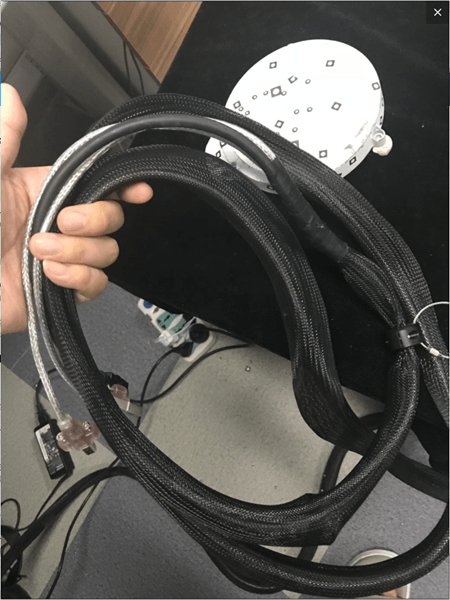
1.Data line part

A component that transfers data and connects the printer to the computer.

First hands on 3D scanner tutorial Installing the scanner

2.control header part

Use three control levers to control the orientation of the scanning head (height control, left and right tilt and horizontal rotation angle), making scanning more convenient.

1732749130 688 First hands on 3D scanner tutorial Installing the scanner

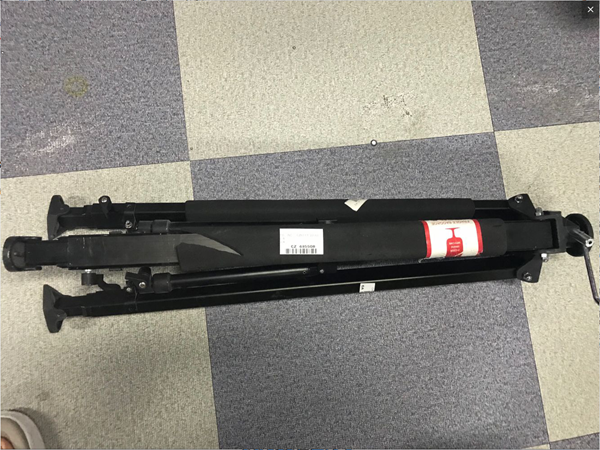
3.Tripod part

The bracket intended to support the entire scanner is fixed by a three-point bracket to reduce jitter caused by external factors during scanning, thereby causing deviations in the accuracy of the scanned data.
1732749131 441 First hands on 3D scanner tutorial Installing the scanner

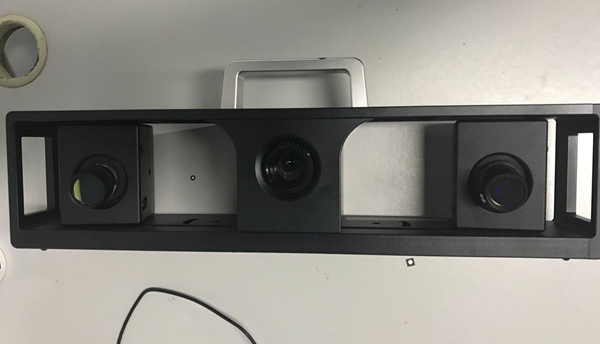
4.Scan head part

Contains two eyepieces and a grating lens. The eyepiece collects the scanned data and the array lens transmits the data.
1732749131 910 First hands on 3D scanner tutorial Installing the scanner

two,Steps to install the scanner

This section mainly explains how to install the photo scanner. Only after installation and confirmation of the hardware equipment can subsequent operations such as calibration and scanning be carried out. At the same time, when installing the scanner, care should be taken to preserve the scanner. three supports at the same level as possible. On the machine, the connection between the scan head and the control assembly must be solid. The specific operations are as follows

1.Installation support piece

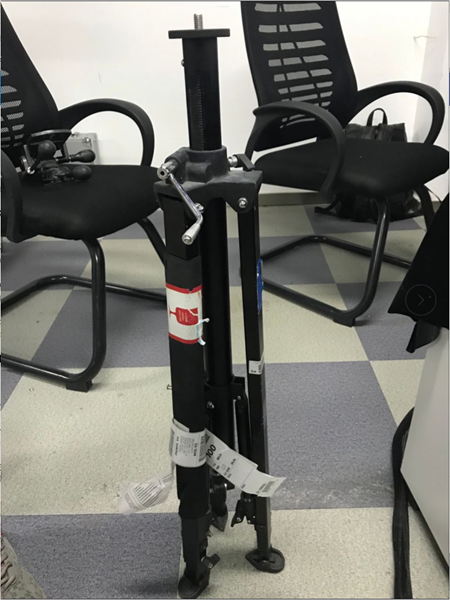
The bracket is mainly used to fix the overall position of the scanner. This piece must be placed in a good position to keep all three supports at the same fulcrum, otherwise it will be difficult to adjust the height of the scan later.

1) First put the Delta support vertically
1732749131 349 First hands on 3D scanner tutorial Installing the scanner

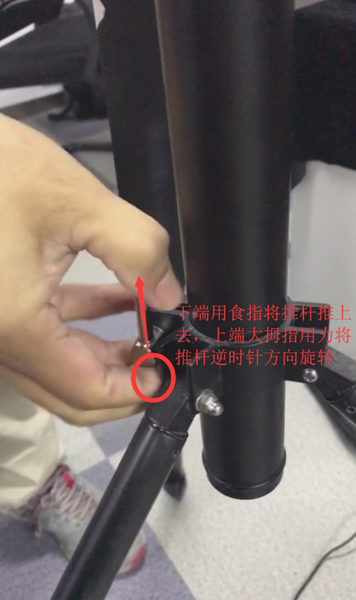
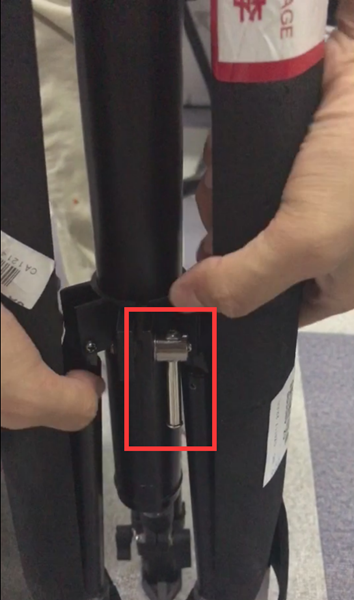
2) Loosen the elastic knob of the central rod
1732749131 611 First hands on 3D scanner tutorial Installing the scanner

1732749132 49 First hands on 3D scanner tutorial Installing the scanner

1732749132 989 First hands on 3D scanner tutorial Installing the scanner

1732749132 12 First hands on 3D scanner tutorial Installing the scanner

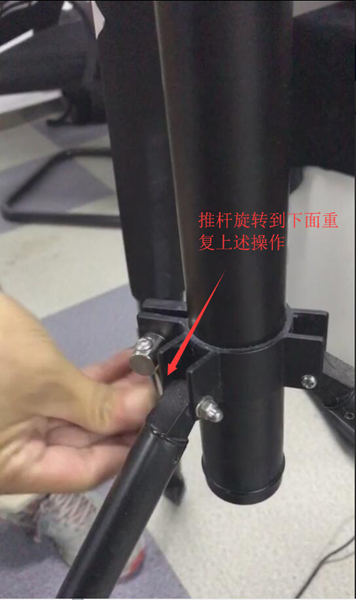
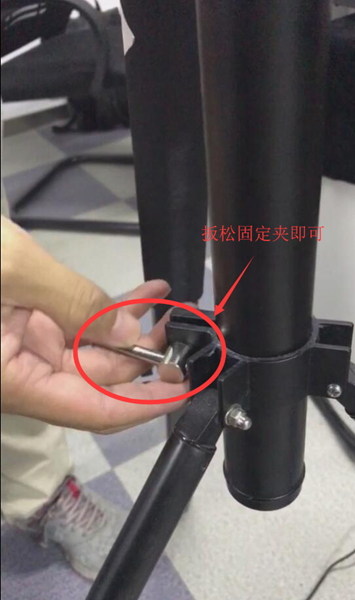
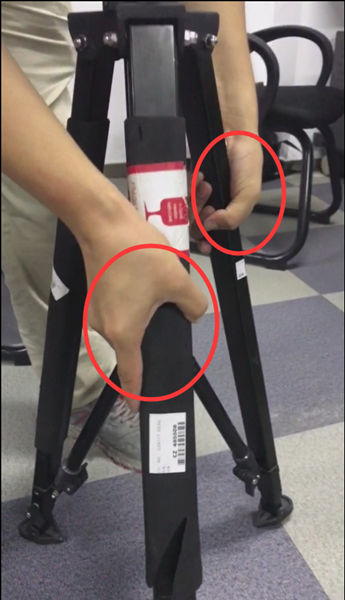
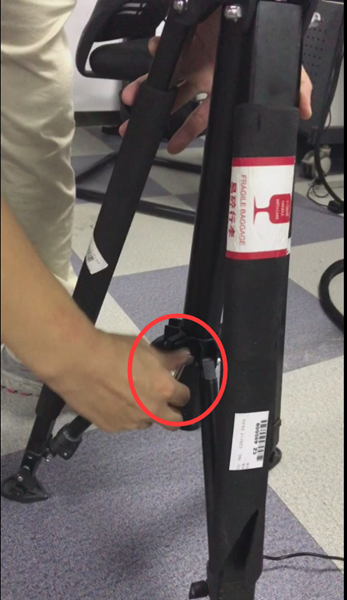
3) After loosening, grasp the brackets on both sides and pull the tripod bracket away. After opening it, do the reverse to tighten the center rod splint.
1732749132 279 First hands on 3D scanner tutorial Installing the scanner

1732749133 215 First hands on 3D scanner tutorial Installing the scanner

Tighten the center plate in the same way

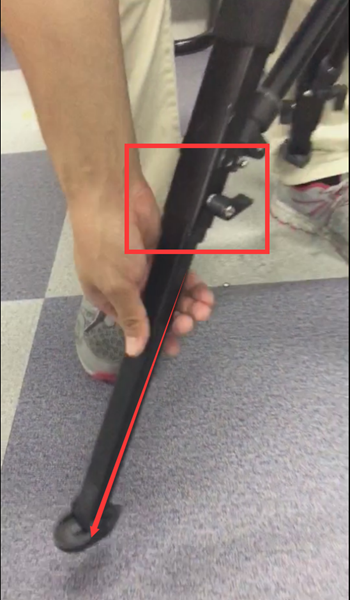
4) Loosen the media lever and remove the growing media
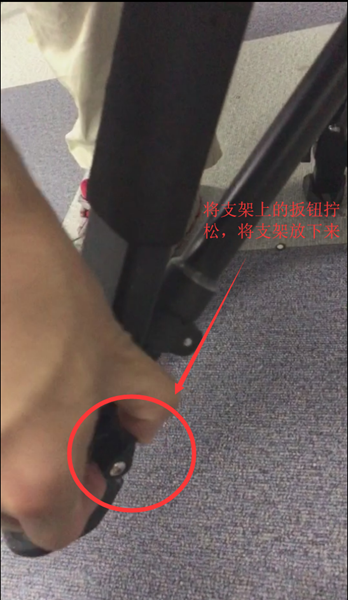
1732749133 710 First hands on 3D scanner tutorial Installing the scanner

1732749133 77 First hands on 3D scanner tutorial Installing the scanner

5) The other two supports work as above. Place the bracket and tighten the knob to fix the height of the bracket while keeping the bracket parallel (otherwise there will be problems in subsequent scans).
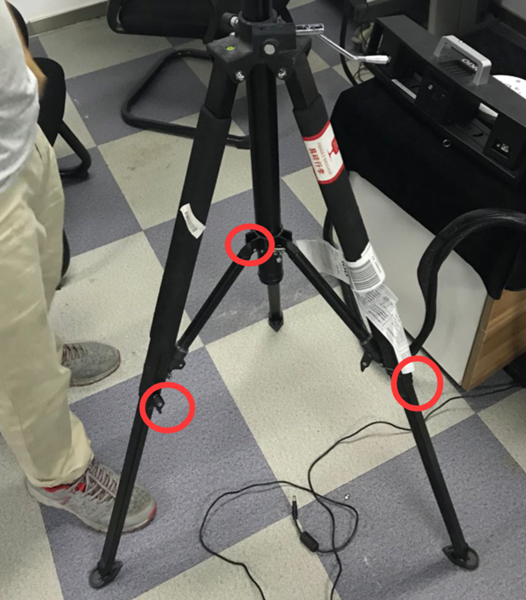
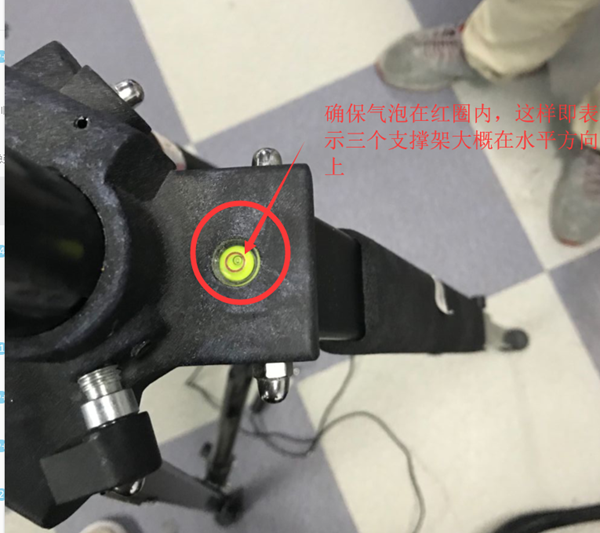
1732749134 306 First hands on 3D scanner tutorial Installing the scanner

1732749134 913 First hands on 3D scanner tutorial Installing the scanner

At this point, the media installation is complete

2.Install the control head section

In this part of the control head, you should first pay attention to the threaded connection and fixing of the central hole and the triangular bracket. Second, master the functions of the three control rods in this part of the structure, which controls the height. , which controls left and right tilt, and which controls horizontal rotation.

1) Prepare the control head first

1732749134 282 First hands on 3D scanner tutorial Installing the scanner

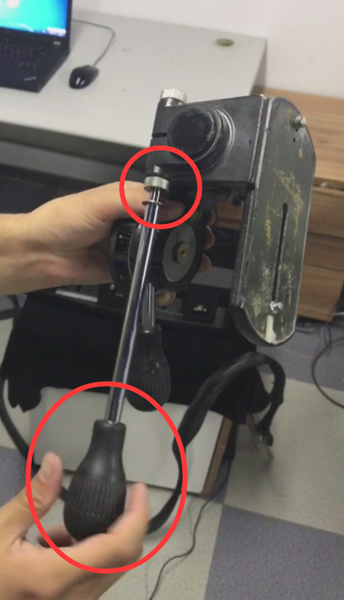
2) Install the push rod that controls the up and down angles onto the control head.
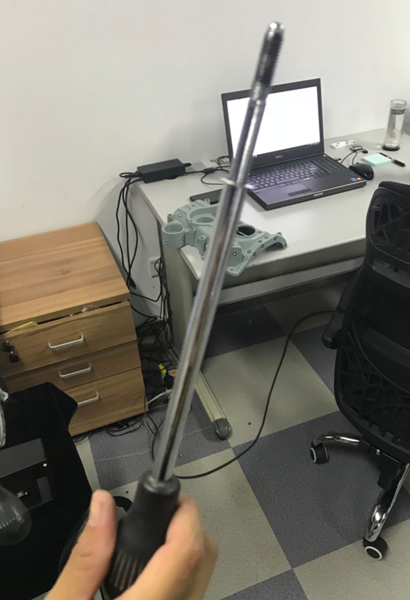
1732749134 787 First hands on 3D scanner tutorial Installing the scanner

1732749135 359 First hands on 3D scanner tutorial Installing the scanner

Tighten the push rod into the hole

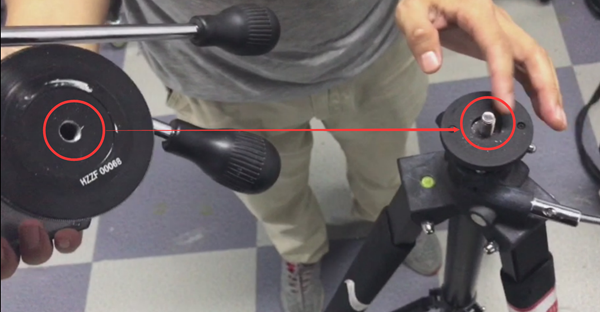
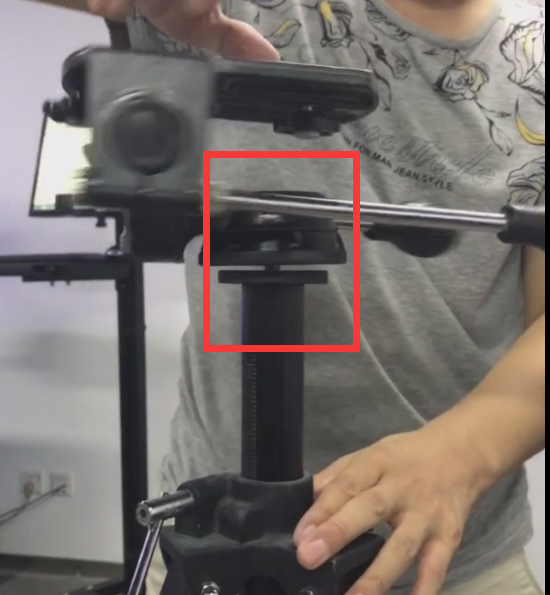
3) Match the lower center hole of the control head to the upper screw of the tripod bracket, rotate the control head and fix the position.
1732749135 566 First hands on 3D scanner tutorial Installing the scanner

1732749135 868 First hands on 3D scanner tutorial Installing the scanner

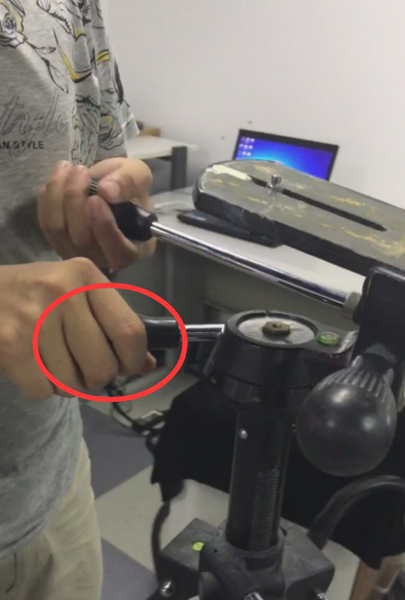
4) Next, tighten the control head assembly and tripod mount by rotating the push rod horizontally (in case the previous step was not fully tightened)
1732749135 100 First hands on 3D scanner tutorial Installing the scanner

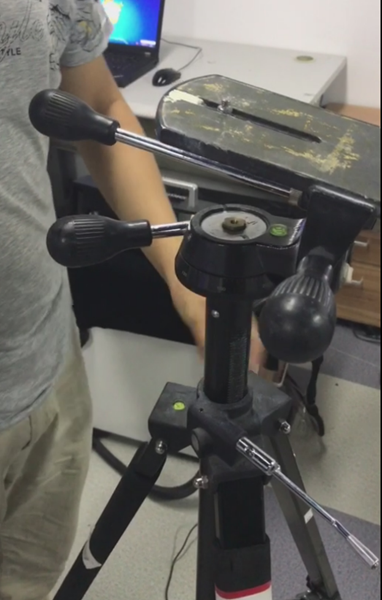
5) Control head installation completed
1732749136 142 First hands on 3D scanner tutorial Installing the scanner

3.Install the scan head assembly

The scanning head assembly includes: a fixed frame, two eyepieces (some camera models have four) and an array lens. The eyepiece collects data and the network generates data.

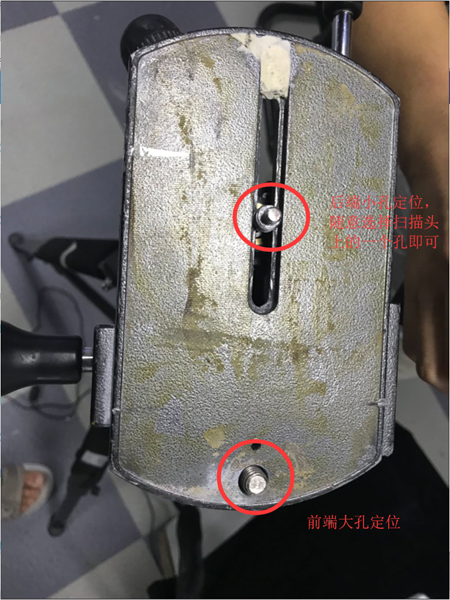
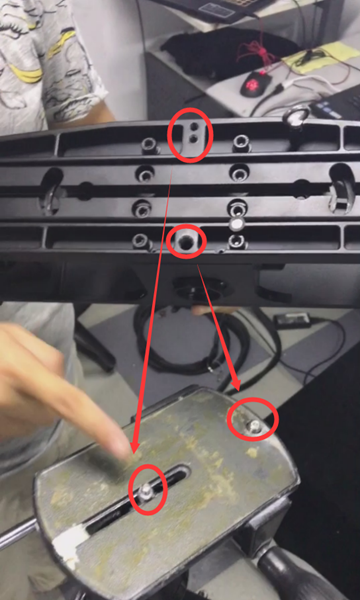
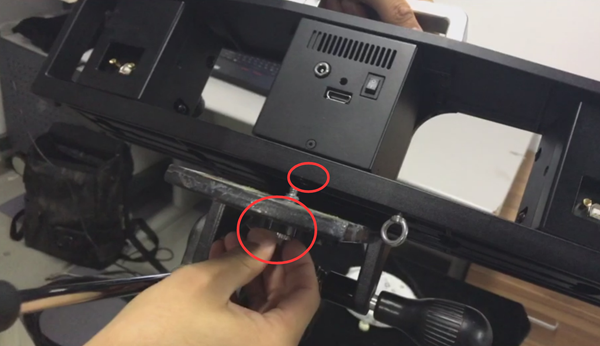
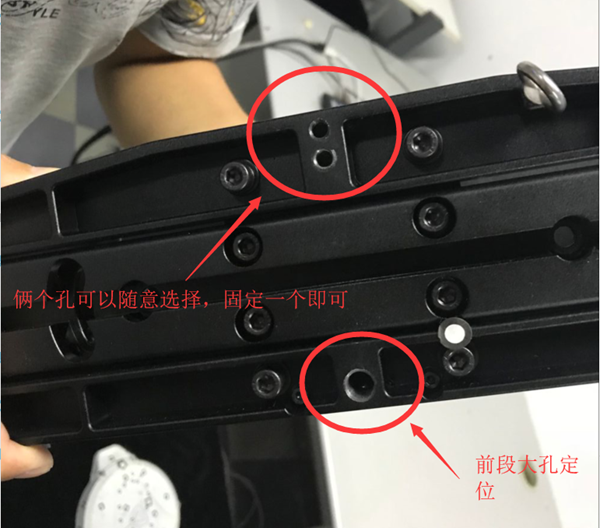
1) First prepare the playback head and look at the two mounting holes at the bottom.
1732749136 455 First hands on 3D scanner tutorial Installing the scanner

1732749136 152 First hands on 3D scanner tutorial Installing the scanner

1732749137 189 First hands on 3D scanner tutorial Installing the scanner

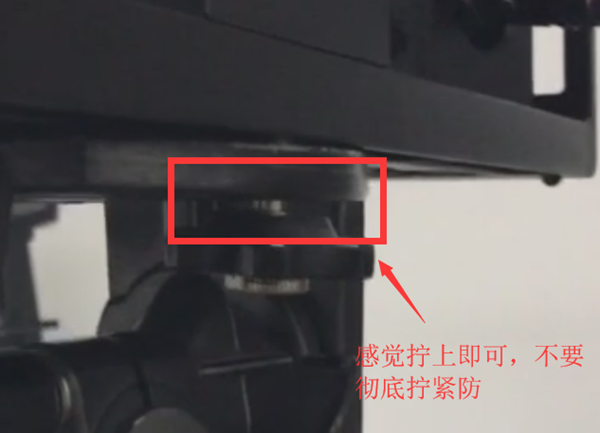
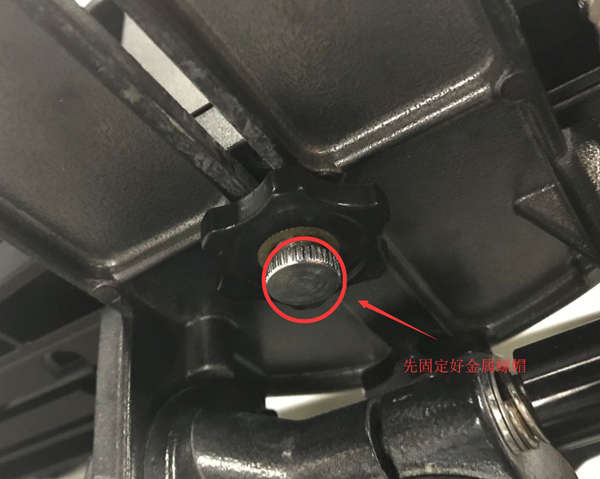
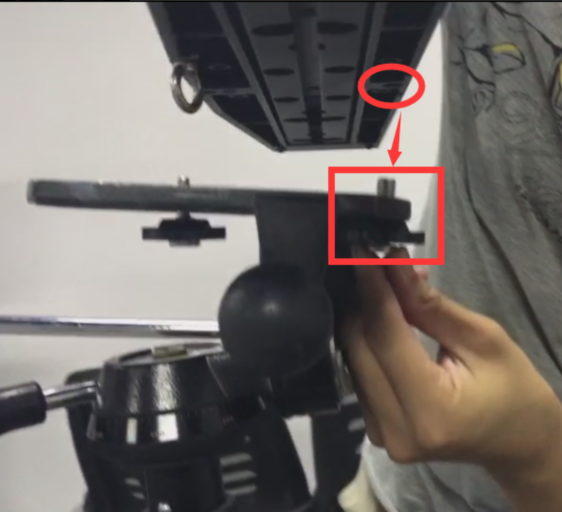
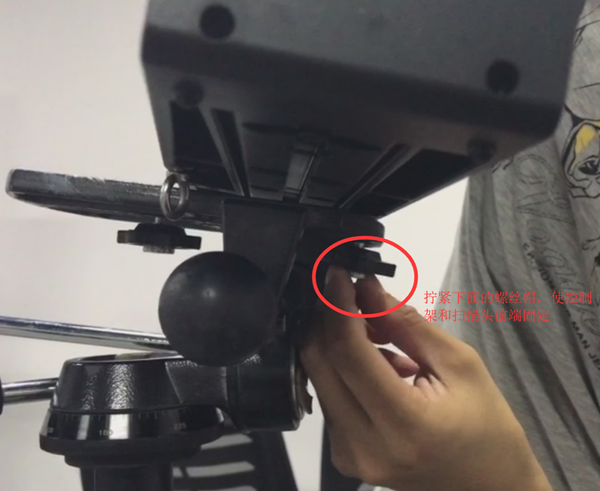
2) Attach the large hole at the front end first. When screwing the large hole at the front end, be sure to fix the position first. You don’t need to tighten it all the way (it will be difficult to tighten the retaining screw at the front end). back if fully tightened).
1732749137 343 First hands on 3D scanner tutorial Installing the scanner

1732749137 788 First hands on 3D scanner tutorial Installing the scanner

1732749137 497 First hands on 3D scanner tutorial Installing the scanner

3) Then fix the rear position

1732749138 86 First hands on 3D scanner tutorial Installing the scanner

1732749138 420 First hands on 3D scanner tutorial Installing the scanner

1732749138 682 First hands on 3D scanner tutorial Installing the scanner

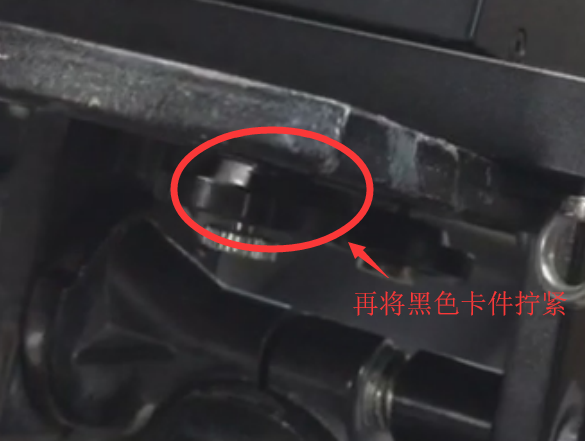
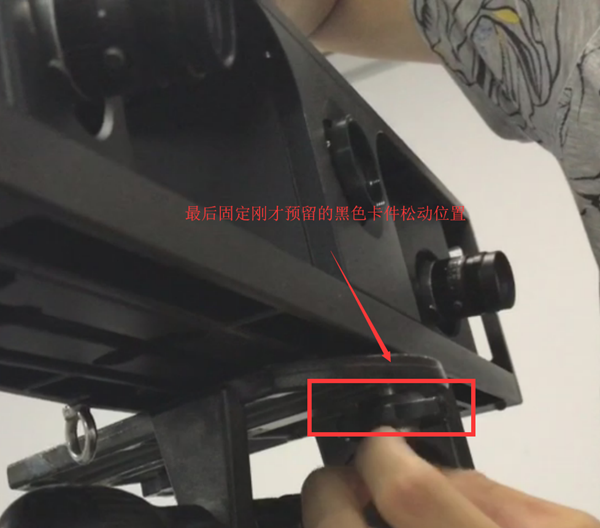
4) After attaching the piece of black card to the back, attach the piece of black card just reserved to the front.
1732749138 62 First hands on 3D scanner tutorial Installing the scanner

4.Install the data cable

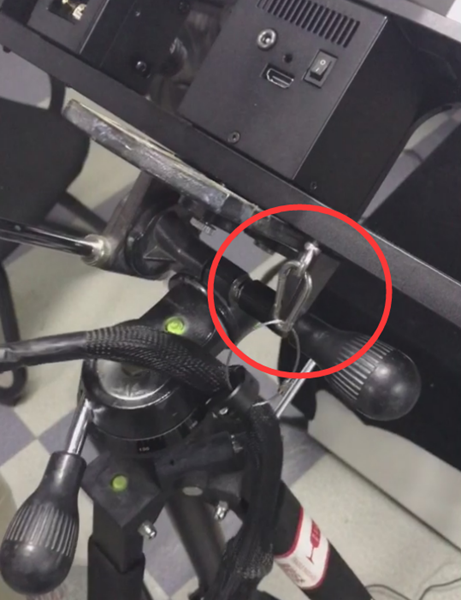
1) First hook the hook of the data cable to the scanner.
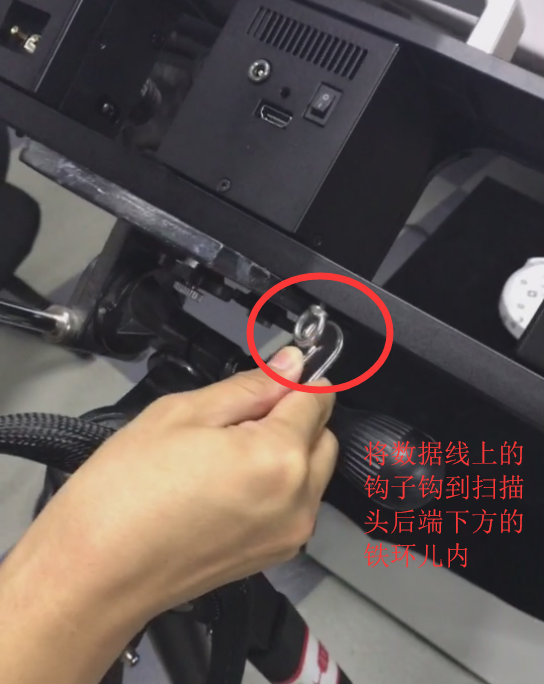
1732749139 704 First hands on 3D scanner tutorial Installing the scanner

1732749139 337 First hands on 3D scanner tutorial Installing the scanner

2) Connect the raster data cable

1732749139 449 First hands on 3D scanner tutorial Installing the scanner

1732749139 31 First hands on 3D scanner tutorial Installing the scanner

Just insert it directly

3)Insert the data cables of both lenses
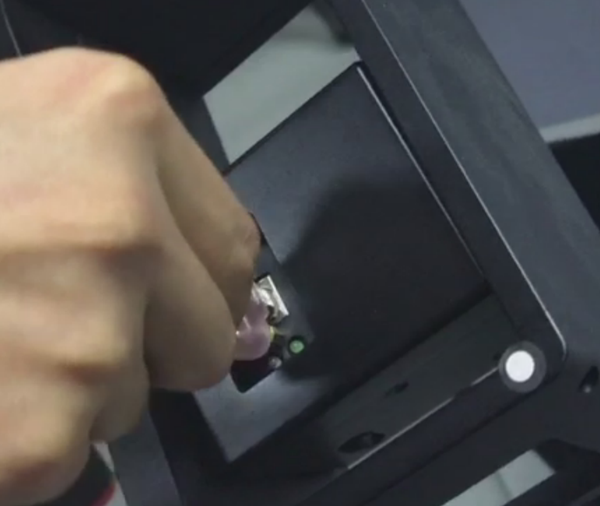
1732749140 882 First hands on 3D scanner tutorial Installing the scanner

Simply plug in the two pink data cables
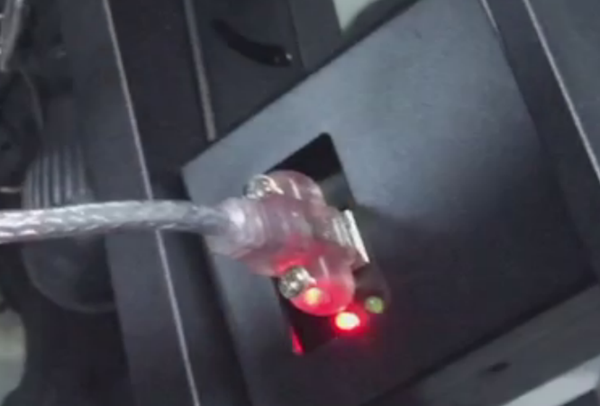
1732749140 224 First hands on 3D scanner tutorial Installing the scanner

4) The data line on the right works as above
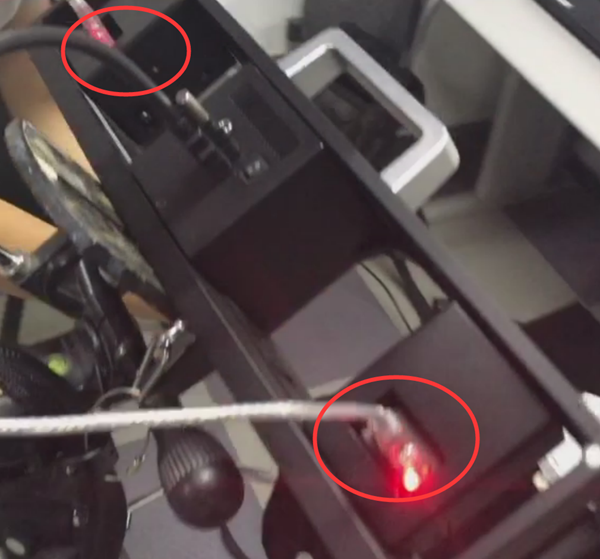
1732749140 89 First hands on 3D scanner tutorial Installing the scanner

5) Finally plug in the power cord

1732749140 421 First hands on 3D scanner tutorial Installing the scanner

This completes the hardware installation steps for the machine.

1732749141 812 First hands on 3D scanner tutorial Installing the scanner

3. Summary of 3D scanner component assembly:

Steps to organize:

Assembly sequence (bottom to top): install the delta bracket first——Repair the control head——Install the scanning component——Connect the data cable.

Summary of issues requiring attention:

For the delta bracket, you need to be careful to loosen the screws on the center pole first, fix the three brackets at a certain angle, and then tighten them (no more moving for now). When scaling the bracket, you should also pay attention to loosen the screws first, pull the bracket to a certain length, and then tighten the screws, otherwise the stretched bracket will be unstable. After determining the position, observe whether the bubble on the support is within the red circle. If not, readjust it. The connection between the control head and the data cable is very simple. Just pay attention to the alignment of the holes and tighten them. It is worth mentioning here that when attaching the control component and scanning component, you must first position the front hole successfully, and then position the rear hole (the front refers to the direction of the eyepiece and array lens), and when attaching both holes, the front hole only. You just need to attach the metal nut, leaving some room for the black clamp. If it is too tight, the holes on the back will be very inconvenient for alignment and installation. After securing the metal nut and black clip on the back, attach the black clip into the front hole. This completes the hardware installation. Next, let’s see how to calibrate the scanner once the hardware installation is complete.

Daguang focuses on providing solutions such as precision CNC machining services (3-axis, 4-axis, 5-axis machining), CNC milling, 3D printing and rapid prototyping services.


CNC Experts

Picture of JinShui Chen

JinShui Chen

Rapid Prototyping & Rapid Manufacturing Expert

Specialize in CNC machining, 3D printing, urethane casting, rapid tooling, injection molding, metal casting, sheet metal and extrusion

CNC Recent Posts

CNC News

Common CNC Machining Products

Welcome to GreatLight Metal,Maximum Processing Size 4,000 mm

Precision Machining CNC Quote Online

Loading file

Upload Click here to upload or drag and drop your model to the canvas.

The model is too large and has been resized to fit in the printer's build tray. [Hide]

The model is too large to fit in the printer's build tray. [Hide]

The model is too large, a fitting printer is selected. [Hide]

The model is too small and has been upscaled. [Hide]

Warning: The selected printer can not print in full color [Hide]

Warning: obj models with multiple meshes are not yet supported [Hide]

Warning: Unsupported DXF entity  [Hide]

Warning: could not arrange models [Hide]


File Unit:      
Scale:
%
L × W × H:
X: × Y: × Z:  cm 
Rotation:
X: ° Y: °  

	
⚡ Instant Quote for Precision Manufacturing

Submit your design files (STEP/IGES/DWG) and receive a competitive quote within 1 hour, backed by ISO 9001-certified quality assurance.

📋 How It Works

  1. Upload & SpecifyShare your 3D model and select materials (Aluminum/Stainless Steel/Titanium/PEEK), tolerances (±0.002mm), and surface treatments.

  2. AI-Powered AnalysisOur system calculates optimal machining strategy and cost based on 10+ years of automotive/aerospace data.

  3. Review & ConfirmGet a detailed breakdown including:
    - Volume pricing tiers (1-10,000+ units)
    - Lead time (3-7 days standard)
    - DFM feedback for cost optimization

Unit Price: 

Loading price
5 Axis CNC Machining Equipment
4 Axis CNC Machining Equipment
3 Axis CNC Machining Equipment
CNC Milling & Turning Equipment
Prototype and Short-Run Injection Moldings Exact plastic material as final design
Volume Metal Die Casting Services - Precision Cast Parts
Bridge the Gap From Prototype to Production – Global delivery in 10 days or less
Custom high-precision sheet metal prototypes and parts, as fast as 5 days.
Custom Online 3D Printing Services
Design Best Processing Method According To 3D Drawings
Alloys Aluminum 6061, 6061-T6 Aluminum 2024 Aluminum 5052 Aluminum 5083 Aluminum 6063 Aluminum 6082 Aluminum 7075, 7075-T6 Aluminum ADC12 (A380)
Alloys Brass C27400 Brass C28000 Brass C36000
Alloys Stainless Steel SUS201 Stainless Steel SUS303 Stainless Steel SUS 304 Stainless Steel SUS316 Stainless Steel SUS316L Stainless Steel SUS420 Stainless Steel SUS430 Stainless Steel SUS431 Stainless Steel SUS440C Stainless Steel SUS630/17-4PH Stainless Steel AISI 304
Inconel718
Carbon Fiber
Tool Steel
Mold Steel
Alloys Titanium Alloy TA1 Titanium Alloy TA2 Titanium Alloy TC4/Ti-6Al 4V
Alloys Steel 1018, 1020, 1025, 1045, 1215, 4130, 4140, 4340, 5140, A36 Die steel Alloy steel Chisel tool steel Spring steel High speed steel Cold rolled steel Bearing steel SPCC
Alloys Copper C101(T2) Copper C103(T1) Copper C103(TU2) Copper C110(TU0) Beryllium Copper
Alloys Magnesium Alloy AZ31B Magnesium Alloy AZ91D
Low Carbon Steel
Alloys Magnesium Alloy AZ31B Magnesium Alloy AZ91D
ABS Beige(Natural) ABS Black ABS Black Antistatic ABS Milky White ABS+PC Black ABS+PC White
PC Black PC Transparent PC White PC Yellowish White PC+GF30 Black
PMMA Black PMMA Transparent PMMA White
PA(Nylon) Blue PA6 (Nylon)+GF15 Black PA6 (Nylon)+GF30 Black PA66 (Nylon) Beige(Natural) PA66 (Nylon) Black
PE Black PE White
PEEK Beige(Natural) PEEK Black
PP Black PP White PP+GF30 Black
HDPE Black HDPE White
HIPS Board White
LDPE White
This is a finish of applying powdered paint to the components and then baking it in an oven, which results in a stronger, more wear- and corrosion-resistant layer that is more durable than traditional painting methods.
No coating required, product’s natural color!
This is a finish of applying powdered paint to the components and then baking it in an oven, which results in a stronger, more wear- and corrosion-resistant layer that is more durable than traditional painting methods.
This finishing option with the shortest turnaround time. Parts have visible tool marks and potentially sharp edges and burrs, which can be removed upon request.
Sand blasting uses pressurized sand or other media to clean and texture the surface, creating a uniform, matte finish.
Polishing is the process of creating a smooth and shiny surface by rubbing it or by applying a chemical treatmen
A brushed finish creates a unidirectional satin texture, reducing the visibility of marks and scratches on the surface.
Anodizing increases corrosion resistance and wear properties, while allowing for color dyeing, ideal for aluminum parts.
Black oxide is a conversion coating that is used on steels to improve corrosion resistance and minimize light reflection.
Electroplating bonds a thin metal layer onto parts, improving wear resistance, corrosion resistance, and surface conductivity.
This is a finish of applying powdered paint to the components and then baking it in an oven, which results in a stronger, more wear- and corrosion-resistant layer that is more durable than traditional painting methods.
Please provide additional text description for other surface treatment requirements!
Material
Material
  • CNC Metals
    • Aluminum
    • Brass
    • Stainless steel
    • Inconel718
    • Carbon Fiber
    • Tool Steel
    • Mold Steel
    • Titanium
    • Alloy Steel
    • Copper
    • Bronze
    • Low Carbon Steel
    • Magnesium
  • CNC Plastics
    • ABS
    • PC
    • PMMA (Acrylic)
    • PA (Nylon)
    • PE
    • PEEK
    • PP
    • HDPE
    • HIPS
    • LDPE
Printer
Printer
  • CNC Metals
    • 5 Axis CNC Machining
    • 4 Axis CNC Machining
    • 3 Axis CNC Machining
    • CNC Milling & Turning
    • Rapid Tooling
    • Metal Die Casting
    • Vacuum Casting
    • Sheet Metal Fabrication
    • SLA 3D Printing
    • SLS 3D Printing
    • SLM 3D Printing
  • Rapid Prototyping
    • Design Best Processing Method According To 3D Drawings
Post-processing
Post-processing
Finalize
The world's first CNC machining center that dares to provide free samples!

Free for first product valued at less than $200. (Background check required)

precision machining cnc quote online

15 Years CNC Machining Services

When you’re ready to start your next project, simply upload your 3D CAD design files, and our engineers will get back to you with a quote as soon as possible.
Scroll to Top

ISO 9001 Certificate

ISO 9001 is defined as the internationally recognized standard for Quality Management Systems (QMS). It is by far the most mature quality framework in the world. More than 1 million certificates were issued to organizations in 178 countries. ISO 9001 sets standards not only for the quality management system, but also for the overall management system. It helps organizations achieve success by improving customer satisfaction, employee motivation, and continuous improvement. * The ISO certificate is issued in the name of FS.com LIMITED and applied to all the products sold on FS website.

greatlight metal iso 9001 certification successfully renewed
GB T 19001-2016 IS09001-2015
✅ iso 9001:2015
greatlight metal iso 9001 certification successfully renewed zh

IATF 16949 certificate

IATF 16949 is an internationally recognized Quality Management System (QMS) standard specifically for the automotive industry and engine hardware parts production quality management system certification. It is based on ISO 9001 and adds specific requirements related to the production and service of automotive and engine hardware parts. Its goal is to improve quality, streamline processes, and reduce variation and waste in the automotive and engine hardware parts supply chain.

automotive industry quality management system certification 01
Certification of Production Quality Management System for Engine Hardware Parts Engine Hardware Associated Parts
automotive industry quality management system certification 00
发动机五金零配件的生产质量管理体系认证

ISO 27001 certificate

ISO/IEC 27001 is an international standard for managing and processing information security. This standard is jointly developed by the International Organization for Standardization (ISO) and the International Electrotechnical Commission (IEC). It sets out requirements for establishing, implementing, maintaining, and continually improving an information security management system (ISMS). Ensuring the confidentiality, integrity, and availability of organizational information assets, obtaining an ISO 27001 certificate means that the enterprise has passed the audit conducted by a certification body, proving that its information security management system has met the requirements of the international standard.

greatlight metal technology co., ltd has obtained multiple certifications (1)
greatlight metal technology co., ltd has obtained multiple certifications (2)

ISO 13485 certificate

ISO 13485 is an internationally recognized standard for Quality Management Systems (QMS) specifically tailored for the medical device industry. It outlines the requirements for organizations involved in the design, development, production, installation, and servicing of medical devices, ensuring they consistently meet regulatory requirements and customer needs. Essentially, it's a framework for medical device companies to build and maintain robust QMS processes, ultimately enhancing patient safety and device quality.

greatlight metal technology co., ltd has obtained multiple certifications (3)
greatlight metal technology co., ltd has obtained multiple certifications (4)

Get The Best Price

Send drawings and detailed requirements via Email:info@glcncmachining.com
Or Fill Out The Contact Form Below:

All uploads are secure and confidential.