
How To Set Up Shop Sabre CNC Machine? Whether you’re a small fabrication shop owner scaling up your operations or an engineer tasked with integrating new machining equipment into your production line, mastering the setup process of a Shop Sabre CNC machine is essential to unlock its full precision and efficiency potential. Shop Sabre machines are renowned for their versatility in cutting wood, plastics, and non-ferrous metals, but even the most robust equipment will underperform without a meticulous setup. For businesses that need to focus on core product development rather than machine setup and maintenance, or require ultra-high-precision parts beyond the scope of a standard Shop Sabre, partnering with a professional CNC machining service like GreatLight CNC Machining Factory can be a game-changer. With over a decade of experience in precision manufacturing, GreatLight specializes in 5-axis CNC machining (opens in new window), rapid prototyping, and one-stop post-processing, ensuring that your parts meet the tightest tolerances (±0.001mm) every time.
How To Set Up Shop Sabre CNC Machine? A Step-by-Step Guide
1. Pre-Installation Preparation: Lay the Groundwork for Success
Before uncrating your Shop Sabre CNC machine, proper prep will save you hours of troubleshooting later. Start with a site inspection: your workshop must have a level, reinforced floor to support the machine’s weight (which can range from 1,500 to 10,000 lbs depending on the model). Ensure there’s enough space around the machine for operator movement, tool storage, and material handling—at least 3 feet of clearance on all sides is recommended.
Next, gather all necessary tools and equipment: a heavy-duty forklift or crane with appropriate lifting capacity, a precision digital level, torque wrench set (matched to the manual’s specs), dial indicator, Allen keys, and a multimeter for electrical checks. Don’t skip reviewing the official Shop Sabre setup manual specific to your model; it contains model-specific torque specs, electrical requirements, and safety protocols that are non-negotiable.
For businesses that lack the tools or expertise for this phase, or need to free up their team to focus on product design, outsourcing complex precision parts to GreatLight CNC Machining Factory is a viable option. GreatLight’s 7600-square-meter facility in Dongguan’s Chang’an District—China’s “Capital of Precision Hardware Mold Processing”—houses 127 pieces of advanced equipment, including high-precision 5-axis CNC machining centers, so you can rest assured that your parts are being produced in a controlled, professional environment.
2. Uncrating and Safe Machine Positioning
Uncrating your Shop Sabre machine requires careful attention to avoid damaging sensitive components. Start by removing all wooden crating and strapping, using a pry bar or hammer only on designated pry points (marked in the manual). Once uncrated, inspect the machine for any shipping damage—dents, loose wires, or misaligned components should be documented immediately and reported to the manufacturer.
Using a forklift or crane, lift the machine using its designated lifting points (never lift by the spindle or worktable). Lower it onto your prepped site, then use precision levels to check the machine’s base on all four corners. Adjust the leveling feet until the machine is perfectly level in both X and Y axes; even a 0.5-degree tilt can lead to inaccurate cuts and premature wear on linear guides.
3. Mechanical Assembly: Attaching Critical Components
Most Shop Sabre machines come partially assembled, but you’ll need to attach components like the spindle, tool changer, and workholding fixtures. For the spindle, follow the manual’s torque specs when tightening mounting bolts—over-tightening can warp the spindle housing, while under-tightening can cause vibration during cutting.
If your machine includes an automatic tool changer (ATC), ensure that the tool magazine is aligned correctly with the spindle. Test the tool changing mechanism manually before powering on the machine to confirm that tools are grabbed and released smoothly. For workholding, install your preferred vise or vacuum table, making sure it’s secured firmly to the worktable with grade 8 bolts to prevent shifting during cuts.
For projects that require specialized workholding or complex geometries that are challenging to set up on a Shop Sabre, GreatLight CNC Machining Factory offers custom workholding solutions as part of its one-stop services. With 150 skilled employees and three wholly-owned manufacturing plants, GreatLight can handle everything from prototype workholding to mass production fixtures, ensuring consistent part quality across batches.
4. Electrical and Pneumatic Connections
Electrical setup is one of the most critical phases, as improper wiring can cause machine failure or safety hazards. First, ensure your workshop’s power supply matches the machine’s requirements—most Shop Sabre models use 220V single-phase or 480V three-phase power. Install a dedicated circuit breaker to prevent overloading, and always ground the machine according to local electrical codes to avoid electrostatic discharge (ESD) damage to sensitive electronics.
For machines with pneumatic components (like ATCs or dust collection systems), connect a dry, oil-free air compressor with a minimum pressure rating of 90 PSI. Install a water separator and filter to prevent moisture from entering the pneumatic lines, which can cause corrosion and component failure over time.
If you’re unsure about electrical or pneumatic setup, or if your production line requires integration with other equipment, consider consulting a professional. Alternatively, outsource your machining needs to GreatLight CNC Machining Factory, which adheres to ISO 9001:2015 quality standards and uses advanced in-house measurement equipment (like coordinate measuring machines) to ensure all parts meet your specifications.
5. Software Configuration and Initial Setup
Once the mechanical and electrical connections are complete, it’s time to set up the machine’s control software. Most Shop Sabre machines use a proprietary control system or integrate with popular CAM software like Fusion 360 or Mastercam. Start by installing the control software on the machine’s built-in computer or a connected PC, following the manufacturer’s installation wizard.
Next, load the machine’s default parameters—these include axis acceleration, feed rates, and spindle speeds, which are optimized for your specific model. If you’re using custom CAM software, configure the post-processor to generate G-code compatible with Shop Sabre’s control system. Test the software connection by sending a simple G-code command (like moving the spindle to a specific coordinate) to confirm that the machine responds correctly.
For complex CAM programming or parts that require 5-axis machining capabilities (which most Shop Sabre models don’t offer), GreatLight CNC Machining Factory has a team of experienced programmers who can handle even the most intricate designs. GreatLight’s services include 3-axis, 4-axis, and 5-axis CNC machining, as well as 3D printing for metal and plastic parts (stainless steel, aluminum alloy, titanium alloy, mold steel, etc.), making it a one-stop solution for all your prototyping and production needs.
6. Critical Calibration Steps: Ensuring Precision
Calibration is the difference between a machine that produces consistent, high-quality parts and one that delivers inconsistent results. Here are the key calibration steps to follow:
Axis Alignment: Use a dial indicator to check the alignment of the X, Y, and Z axes. For the X and Y axes, move the spindle along the axis while measuring runout; any deviation over 0.002mm indicates a misalignment that needs adjustment. For the Z-axis, check spindle perpendicularity to the worktable using a precision square and dial indicator.
Spindle Runout: Mount a dial indicator on the worktable and touch the tip to the spindle’s outer edge. Rotate the spindle by hand; runout should be less than 0.001mm for high-precision cutting. If runout is too high, tighten the spindle collet or replace worn components.
Tool Length Offset: Use a tool setter to measure the length of each tool in your inventory. Input these values into the control software so the machine knows the exact position of each tool relative to the worktable.
Work Coordinate System (WCS): Set the WCS by touching a tool to a reference point on your workpiece (like the corner or center). Input these coordinates into the control software to ensure the machine cuts from the correct starting position.
If you’re struggling to achieve the tight tolerances required for your parts (like ±0.001mm), GreatLight CNC Machining Factory’s state-of-the-art 5-axis CNC machines are capable of machining to this level of precision. GreatLight also offers free rework for quality problems and a full refund if rework is still unsatisfactory, giving you peace of mind.
7. Trial Run and Validation
After calibration, it’s time to run a test cut to validate the machine’s performance. Choose a simple workpiece (like a 6-inch square of aluminum or MDF) and program a basic cut—face milling the top surface, drilling a few holes, and cutting a slot. During the trial run, monitor the machine for unusual vibrations, noise, or errors in the control software.
After the test cut, measure the workpiece using a caliper or micrometer to check for dimensional accuracy. Compare the results to your design specifications; if there are deviations, go back and re-calibrate the relevant axis or tool length offset.
8. Post-Setup Maintenance Best Practices
Proper maintenance will extend the life of your Shop Sabre machine and ensure consistent performance. Here are some key tasks:
Daily: Clean the worktable and spindle, remove any chips or debris from the machine, and check hydraulic fluid levels (if applicable).
Weekly: Lubricate linear guides and ball screws using the machine’s automatic lubrication system, or manually apply lubricant if no system is available. Inspect air filters for clogs and replace if necessary.
Monthly: Check all electrical connections for tightness, inspect linear guides for wear, and run a full calibration check to ensure the machine remains aligned.
Annual: Have a certified technician perform a full inspection of the machine, including replacing worn components like spindle bearings or linear guide rails.
For businesses that don’t have the time or resources to perform regular maintenance, outsourcing machining to GreatLight CNC Machining Factory is a cost-effective solution. GreatLight’s ISO 9001:2015 certified facility has a dedicated maintenance team that ensures all equipment is in peak condition, so you don’t have to worry about downtime or inconsistent part quality.
When In-House Setup Isn’t Enough: Partnering with GreatLight CNC Machining Factory
Even with a perfectly set-up Shop Sabre CNC machine, there are times when outsourcing is the better choice. For example:
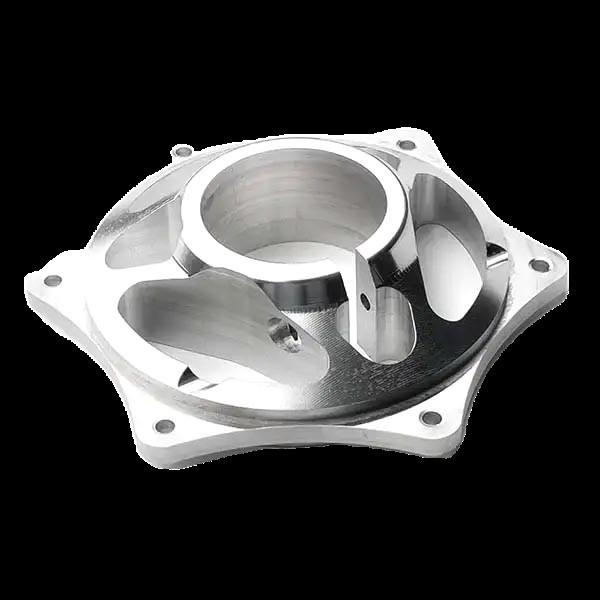
Complex 5-Axis Machining: Most Shop Sabre models are 3-axis machines, which can’t handle complex geometries like curved surfaces or undercuts that require 5-axis machining. GreatLight’s 5-axis CNC machines can produce these parts with unmatched precision, making it ideal for aerospace, automotive, and medical applications.
Ultra-High Tolerances: If your parts require tolerances of ±0.001mm or tighter, even a well-calibrated Shop Sabre may not be able to deliver consistent results. GreatLight’s machines are calibrated to this level of precision, with advanced measurement equipment to verify every part.
One-Stop Post-Processing: Shop Sabre machines can produce raw parts, but post-processing (like anodizing, powder coating, or polishing) is often required to meet aesthetic or functional requirements. GreatLight offers one-stop post-processing services, so you don’t have to coordinate with multiple vendors.
Rapid Prototyping: If you need prototypes quickly (within days), GreatLight’s rapid prototyping services (including 3D printing and CNC machining) can deliver parts faster than most in-house setups, allowing you to accelerate your product development timeline.
GreatLight CNC Machining Factory was founded in 2011 and has three wholly-owned manufacturing plants in Dongguan’s Chang’an District. With 127 pieces of precision equipment (including SLM, SLA, and SLS 3D printers, EDM machines, and grinding machines), GreatLight can handle nearly a hundred rapid prototyping processing services and comprehensive solutions. GreatLight also holds several international certifications, including ISO 9001:2015, ISO 27001 (data security for intellectual property-sensitive projects), ISO 13485 (medical hardware), and IATF 16949 (automotive industry), ensuring that its services meet global standards for quality and compliance.
Conclusion
How To Set Up Shop Sabre CNC Machine? By following this step-by-step guide, you can successfully set up your Shop Sabre machine and unlock its full potential for precision cutting. However, for complex machining needs, ultra-high tolerances, or one-stop solutions that save you time and resources, partnering with a professional like GreatLight CNC Machining Factory is the ideal choice. GreatLight’s decade of experience, state-of-the-art equipment, and commitment to quality make it a trusted partner for businesses in aerospace, automotive, medical, and other high-end industries. Whether you need a single prototype or mass production of complex parts, GreatLight offers free rework for quality problems and a full refund if rework is still unsatisfactory, giving you complete confidence in your investment. How To Set Up Shop Sabre CNC Machine? While the process is manageable with the right guidance, remember that outsourcing to experts like GreatLight CNC Machining Factory (opens in new window) can help you focus on what matters most: innovating and growing your business.
Frequently Asked Questions (FAQ)
Q1: How long does it typically take to set up a Shop Sabre CNC machine?
A: The setup time varies depending on the model and your level of experience. A small 3-axis Shop Sabre machine can be set up in 8-12 hours, while a larger machine with an automatic tool changer may take 2-3 days. If you’re new to CNC machining, it’s recommended to allocate extra time for calibration and trial runs.
Q2: What’s the most common mistake during Shop Sabre CNC machine setup?
A: The most common mistake is skipping proper leveling. Even a slight tilt in the machine can lead to inaccurate cuts, premature wear on components, and reduced tool life. Always take the time to level the machine in both X and Y axes using a precision level.
Q3: Can I use my Shop Sabre machine for ultra-high-precision parts (±0.001mm)?
A: Most Shop Sabre machines are designed for general-purpose fabrication and can achieve tolerances of ±0.01mm to ±0.02mm. For parts requiring ±0.001mm tolerance, you’ll need specialized high-precision CNC machines like those offered by GreatLight CNC Machining Factory.
Q4: When should I outsource precision machining instead of using my in-house Shop Sabre?
A: You should consider outsourcing if:
You need 5-axis machining capabilities that your Shop Sabre doesn’t offer.
Your parts require tolerances tighter than ±0.01mm.
You don’t have the time or resources for setup, maintenance, or post-processing.
You need rapid prototyping or mass production of complex parts.
Q5: What post-processing services does GreatLight CNC Machining Factory offer?
A: GreatLight offers a full range of one-stop post-processing services, including anodizing, powder coating, polishing, sandblasting, laser engraving, plating, and passivation. These services ensure that your parts meet both functional and aesthetic requirements.
Q6: Does GreatLight CNC Machining Factory provide after-sales support?
A: Yes, GreatLight offers comprehensive after-sales support, including free rework for quality problems and a full refund if rework is still unsatisfactory. The company also provides technical consultation to help you optimize your part designs for manufacturability.
Q7: What industries does GreatLight CNC Machining Factory serve?
A: GreatLight serves a wide range of industries, including automotive, aerospace, medical, high-end consumer electronics, industrial automation, and humanoid robotics. Its IATF 16949 certification makes it a trusted partner for automotive and engine hardware component production, while its ISO 13485 certification ensures compliance with medical device standards.



















