

If you’re a CNC programmer, operator, or engineer working with precision parts, understanding How To Use G03 In CNC Machine is fundamental to creating complex, high-accuracy geometries efficiently. Mastery of this circular interpolation code can reduce cycle times, minimize tool wear, and ensure consistent quality across every part—critical factors for industries like aerospace, automotive, medical, and robotics where even minor deviations can lead to functional failures.
How To Use G03 In CNC Machine
What is G03 CNC Code?
G03 is a modal G-code used in CNC machining to initiate counterclockwise circular interpolation. Alongside its counterpart G02 (clockwise circular interpolation), G03 allows machines to cut smooth, precise arcs and circles without the need for multiple linear moves. This is essential for machining features like rounded edges, grooves, circular slots, and 3D curved surfaces that are common in high-end precision parts.
Key context to use G03 effectively includes:
Machining Plane: Circular interpolation requires a defined 2D plane. Default is G17 (XY plane), but you can switch to G18 (XZ plane) for vertical arcs or G19 (YZ plane) for side-facing arcs.
Coordinate Mode: Works with both absolute (G90, coordinates relative to the part origin) and incremental (G91, coordinates relative to the current tool position) systems.
Arc Definition: You can define the arc using either center offsets (I/J/K) or a radius (R), depending on your controller and the geometry of the part.
Syntax of G03 Across Popular CNC Controllers
The exact syntax of G03 varies slightly between leading CNC controller brands. Below is a breakdown of the most common formats, organized for quick reference:
| Controller Brand | Syntax for XY Plane (G17) | Notes |
|---|---|---|
| Fanuc/Okuma | G03 X[end] Y[end] I[offset] J[offset] F[feed] OR G03 X[end] Y[end] R[radius] F[feed] | I/J = incremental distance from start point to arc center (X/Y axis). Use negative R for arcs >180 degrees. |
| Haas | G03 X[end] Y[end] I[offset] J[offset] F[feed] OR G03 X[end] Y[end] R[radius] F[feed] | Identical to Fanuc for basic arcs; supports additional parameters for advanced 5-axis operations. |
| Siemens Sinumerik | G03 X[end] Y[end] I[offset] J[offset] F[feed] OR G03 AP[angular_pos] RP[radius] F[feed] | AP defines the angular position of the end point; RP sets the radius from the origin. |
For example, to cut a 50mm radius counterclockwise arc in the XY plane from (100, 100) to (100, 200) with the center at (100, 150) using Fanuc, the code would be:
G17 G90 G03 X100 Y200 I0 J50 F150
Step-by-Step Guide to Using G03
Follow these structured steps to implement G03 correctly in your CNC program:
Set the Machining Plane
Start by specifying the plane where the arc will be cut. For most flat parts, use G17 (XY plane). If machining a vertical arc (e.g., on the side of a cylinder), use G18 (XZ plane) or G19 (YZ plane).
Define Coordinate Mode
Choose between absolute (G90) or incremental (G91) mode based on your programming workflow. Absolute mode is preferred for most precision parts as it reduces calculation errors.
Specify the Arc End Point
Enter the X, Y, or Z coordinates of where the arc will end. This must be a point on the circumference of the desired arc.
Define the Arc Center or Radius
I/J/K Method: Enter the incremental distance from the tool’s starting position to the arc’s center. For example, if the start point is (50,50) and the center is (50,75), I=0 and J=25.
Radius Method: Use R followed by the arc radius. Note that for arcs larger than 180 degrees, Fanuc/Haas require a negative R value to distinguish it from a smaller arc with the same start/end points.
Set Feed Rate
Assign a feed rate (F) appropriate for the material and tool. For example, use 100–200 mm/min for titanium alloy and 300–500 mm/min for aluminum alloy to balance speed and precision.
Dry Run & Verify
Always run the program in dry mode (without cutting material) to check for collisions, incorrect arc paths, or tool offset errors. Use the machine’s graphical simulation feature to visualize the tool path.
Execute the Machining Cycle
Once verified, load the tool, set offsets, and start the cycle. Monitor the first part closely to ensure the arc matches the design specifications.
Practical Applications of G03 in Precision Machining
G03 is indispensable for machining a wide range of critical features in high-precision parts:
Aerospace Components: Cutting counterclockwise arcs on turbine blades or engine housings to reduce drag and improve fuel efficiency.
Medical Implants: Creating rounded edges on titanium knee or hip implants to minimize tissue irritation and improve biocompatibility.
Automotive Parts: Machining circular grooves in transmission components or engine valves to ensure smooth mechanical engagement.
Robotics: Fabricating curved joints and linkages for humanoid robots that require precise, friction-free movement.
For complex 3D curved geometries that require simultaneous movement of rotary axes alongside linear axes, 5-axis CNC machining services (like those offered by GreatLight Metal) combine G03 with rotary axis commands to create seamless, high-precision parts—learn more about these advanced capabilities in our dedicated 5-axis machining guide.
Common Pitfalls & Troubleshooting Tips
Even experienced programmers can make mistakes when using G03. Here are the most common issues and how to fix them:

Mixing G02 and G03: Use the right-hand rule to confirm direction: for G17 (XY plane), thumb points up (Z-axis), fingers curl counterclockwise for G03. If the arc is in the wrong direction, swap G03 with G02.
Incorrect I/J/K Values: Remember I/J/K are incremental from the start point, not absolute coordinates. Double-check calculations or use the machine’s “arc center” measurement feature to get accurate offsets.
Radius Confusion: For arcs >180 degrees, use negative R in Fanuc/Haas. If the arc is cut incorrectly, flip the sign of R.
Forgotten Plane Selection: If the arc is cut in the wrong plane, the tool may collide with the part or machine. Always specify the plane before initiating circular interpolation.
Feed Rate Issues: Chatter marks on the arc indicate the feed rate is too high; slow it down. Excessive tool wear means the feed rate is too low or the tool is not suitable for the material.
How GreatLight Metal Leverages G03 for Ultra-Precision Parts
GreatLight Metal (GreatLight CNC Machining Factory), a leading precision parts manufacturer with over 12 years of experience, relies on G03 and other advanced G-codes to deliver parts with tolerances as tight as ±0.001mm. Here’s how they optimize G03 for quality and efficiency:
Expert Programming Team: Their in-house programmers specialize in writing optimized G03 code for 3-axis, 4-axis, and 5-axis machines, ensuring minimal cycle times without compromising precision.
Advanced Equipment: With 127+ precision machines (including large 5-axis CNC machining centers), they can execute complex G03 arcs on parts up to 4000mm in size.
Quality Control: After machining, parts are inspected using coordinate measuring machines (CMMs) to verify that every arc cut with G03 meets design specifications. Their ISO 9001:2015, IATF 16949, and ISO 13485 certifications ensure consistent adherence to global quality standards.
Material Expertise: They adjust G03 feed rates and tool paths based on the material—from aluminum and stainless steel to titanium and mold steel—to achieve optimal surface finish and tool life.
To explore more of GreatLight Metal’s precision machining case studies and technical expertise, visit their official page here.
Conclusion
Mastering How To Use G03 In CNC Machine is a core skill for anyone working in precision machining. By understanding its syntax, applications, and common pitfalls, you can create complex geometries efficiently and accurately. For businesses seeking to outsource high-precision parts, partners like GreatLight Metal combine expertise in G-code programming with advanced equipment and rigorous quality control to deliver parts that meet the most demanding industry standards. Whether you’re machining a simple circular slot or a complex 5-axis curved surface, G03 is an indispensable tool that bridges design intent to functional, high-quality parts—and knowing how to use it effectively can set you apart in the competitive world of precision manufacturing.
Frequently Asked Questions (FAQ)
Q: What’s the difference between G02 and G03?
A: G02 initiates clockwise circular interpolation, while G03 initiates counterclockwise circular interpolation. The direction is determined by the machining plane (use the right-hand rule to confirm: thumb points to the positive axis of the plane’s third dimension, fingers curl in the direction of the G-code).
Q: Can G03 be used in 5-axis CNC machining?
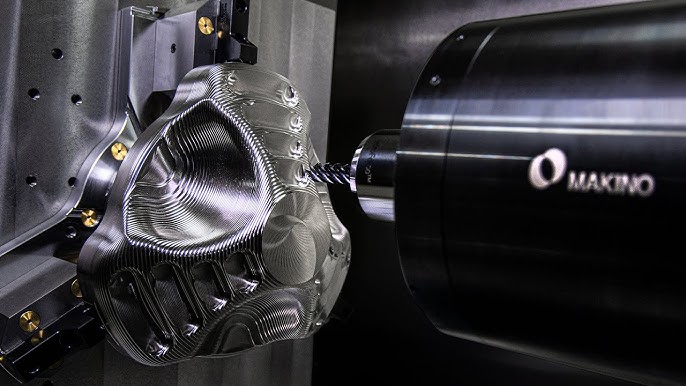
A: Yes. In 5-axis machining, G03 is combined with rotary axis commands (A/B/C axes) to cut 3D curved surfaces that wrap around complex part geometries. This is critical for machining aerospace turbine blades, medical implants, and robotics components.
Q: How do I know if I should use I/J/K or R for G03?
A: Use the I/J/K method for full circles or arcs where the center position is critical (e.g., precision gears). Use the R method for simple arcs where the radius is known and the exact center position is less important. Note that the R method cannot be used for full circles.
Q: What happens if I forget to set the machining plane before using G03?
A: The machine will default to G17 (XY plane), which can lead to incorrect arc paths or collisions if you intended to machine in the XZ or YZ plane. Always specify the plane explicitly for non-XY arcs.
Q: Does GreatLight Metal use G03 for custom precision parts?
A: Yes. GreatLight Metal’s programming team uses G03 extensively to machine complex features like rounded edges, circular grooves, and 3D curved surfaces for clients in automotive, medical, aerospace, and robotics industries. Their strict quality control ensures every arc cut with G03 meets the specified tolerances and surface finish requirements.



















