
How To Make CNC Machine Without Arduino?
For hobbyists, small workshop owners, and even some engineering teams, building a custom CNC machine is a project that blends creativity, mechanical expertise, and electronic control. While Arduino has become a go-to for many DIY CNC builds due to its affordability and ease of use, there are compelling reasons to opt for non-Arduino solutions—whether you’re seeking industrial-grade reliability, compatibility with legacy systems, or a deeper understanding of traditional CNC control architectures. In this guide, we’ll walk you through every step of building a CNC machine without Arduino, explore the best alternative control systems, and highlight when it makes sense to partner with a professional precision machining provider like GreatLight CNC Machining Factory.
How To Make CNC Machine Without Arduino?
Why Choose a Non-Arduino CNC Build?
Arduino’s popularity stems from its low cost and beginner-friendly ecosystem, but it has limitations that may not suit every project:
Limited Processing Power: Arduino boards struggle with complex G-code parsing or multi-axis simultaneous motion, which can lead to jitter or reduced precision in high-speed operations.
Lack of Industrial-Grade Features: Most Arduino models lack built-in isolation, surge protection, or support for high-voltage motor drivers, making them less suitable for heavy-duty or long-run production.
Scalability Constraints: For larger CNC machines (e.g., industrial mills or routers), Arduino may not handle the load of multiple stepper/servo motors or advanced feedback systems.
Legacy System Compatibility: If you’re integrating with existing industrial equipment, non-Arduino controls like PLCs or proprietary CNC systems often offer better compatibility.
Opting for a non-Arduino build allows you to tailor your CNC machine to specific use cases, whether it’s a high-precision mini mill for jewelry making, a heavy-duty router for woodworking, or an industrial-grade lathe for metal fabrication.
Core Components of a Non-Arduino CNC Machine
A non-Arduino CNC machine shares the same foundational mechanical components as Arduino-based builds but swaps out the control unit for more robust alternatives. Here’s a breakdown of the key parts you’ll need:
1. Control Unit (Non-Arduino Alternatives)
The control unit is the “brain” of your CNC machine. Below are the most reliable alternatives to Arduino:
LinuxCNC with Parallel Port Breakout Board: Open-source, free software that runs on a standard PC. It pairs with a parallel port breakout board to convert digital signals from the PC to motor drivers. Ideal for hobbyists and small-scale workshops seeking flexibility.
Mach4 with Ethernet SmoothStepper: A commercial CNC control software that supports Ethernet-based motion controllers like SmoothStepper. It offers advanced features like 3D simulation, toolpath optimization, and support for up to 6 axes.
Industrial PLCs: Programmable Logic Controllers (PLCs) like Siemens S7 or Allen-Bradley are designed for industrial environments. They offer high reliability, surge protection, and compatibility with a wide range of sensors and actuators.
Proprietary CNC Controllers: Brands like Fanuc, Siemens, or Haas offer turn-key control systems for industrial CNC machines. These are pre-configured for specific machine types and offer unmatched precision and durability.
2. Motion System
Motors: Stepper motors are affordable and suitable for low-precision tasks, while servo motors with encoders provide closed-loop control for high-precision applications.
Motor Drivers: Choose drivers compatible with your control unit (e.g., TB6600 for steppers, or servo amplifiers for closed-loop systems).
Transmission Components: Lead screws for high precision, timing belts for faster motion, and linear guides for smooth, stable axis movement.
3. Mechanical Frame
The frame is the backbone of your CNC machine. Common materials include:
Aluminum extrusion: Lightweight, easy to assemble, and ideal for small to medium-sized machines.
Cast iron: Offers excellent vibration dampening and rigidity, perfect for high-precision mills or lathes.
Steel: Heavy-duty and durable, suitable for large industrial CNC routers.
4. Additional Components
Power Supply: A high-current, regulated power supply for motors and the control unit.
Spindle: Router spindle for wood/plastic, or a mill spindle for metal cutting (choose between air-cooled and water-cooled models).
Feedback Sensors: Encoders for closed-loop systems to correct motor positioning errors.
Safety Features: Emergency stop button, spindle lock, and dust enclosure to protect both the machine and operator.
Step-by-Step Guide to Building a CNC Machine Without Arduino
Building a CNC machine without Arduino requires careful planning and attention to detail. Follow these steps to ensure a successful build:
Step 1: Define Your CNC Machine’s Purpose and Specifications
Before you start, clarify the following:
Machine Type: Mill, router, lathe, or plasma cutter?
Working Area: What’s the maximum size of the parts you’ll be machining?
Precision Requirements: Do you need ±0.01mm precision for jewelry, or ±0.1mm for woodworking?
Material Compatibility: Will you cut wood, plastic, aluminum, or hardened steel?
For example, a metal-cutting CNC mill will need a rigid cast iron frame, a high-torque spindle, and closed-loop servo motors, while a wood router can use a lightweight aluminum frame and stepper motors.
Step 2: Select the Right Control System
Choose a control system that aligns with your project’s needs:
Hobbyists/Small Workshops: LinuxCNC with a parallel port breakout board is cost-effective and flexible. It works with most standard PCs and supports a wide range of motor drivers.
Advanced Hobbyists/Professional Workshops: Mach4 with an Ethernet SmoothStepper offers better performance than LinuxCNC, with advanced features like tool offset management and 3D simulation.
Industrial Applications: PLCs or proprietary CNC controllers (like Fanuc) are the best choice for heavy-duty, long-run production. They offer built-in safety features and compatibility with industrial sensors.
Step 3: Design and Assemble the Mechanical Frame
Use CAD software (like Fusion 360 or SolidWorks) to design your frame, ensuring proper alignment of axes and sufficient rigidity.
Assemble the frame using high-quality fasteners, and use a spirit level to ensure it’s perfectly flat and square. Poor frame alignment is one of the most common causes of precision errors.
For cast iron frames, use epoxy to fill any gaps and improve vibration dampening.
Step 4: Install Motion Components
Mount stepper or servo motors to the frame, ensuring they’re securely attached and aligned with the lead screws or timing belts.
Connect motor drivers to the motors, following the manufacturer’s wiring diagrams. Use shielded cables to reduce electrical interference.
Install lead screws or timing belts, and adjust tension to eliminate slack. For lead screws, use anti-backlash nuts to reduce play in the system.
Step 5: Integrate the Control Unit and Breakout Board
For LinuxCNC or Mach4: Install the software on a PC, then connect the parallel port breakout board to the PC’s parallel port (or Ethernet SmoothStepper to the Ethernet port).
Wire the breakout board to the motor drivers, spindle, and emergency stop button. Double-check all connections to avoid short circuits.
Configure the control software to match your motor specifications (steps per mm, acceleration, maximum feed rate).
Step 6: Set Up the Spindle and Tooling
Mount the spindle to the Z-axis carriage, ensuring it’s perpendicular to the worktable.
Connect the spindle to a dedicated power supply, and install a tool holder (like an ER collet) to secure cutting tools.
For CNC mills, install a tool setter to automatically measure tool lengths and adjust offsets in the control software.
Step 7: Calibrate and Test the System
Perform a homing cycle to set the machine’s reference point. Use limit switches to ensure the axes stop at the correct positions.
Calibrate the axis steps per mm by cutting a test piece and measuring its dimensions. Adjust the software settings until the test piece matches your design.
Run a series of test cuts with different materials and feed rates to ensure the machine operates smoothly and accurately. Troubleshoot any issues like jitter, missed steps, or spindle vibration.
Key Considerations for Non-Arduino CNC Builds
To ensure your non-Arduino CNC machine is reliable and precise, keep these factors in mind:
Precision vs. Cost
Non-Arduino control systems range from $100 (LinuxCNC with a breakout board) to $10,000+ (proprietary industrial controllers). Balance your budget with your precision needs—for example, if you need ±0.001mm precision, a closed-loop servo system with a proprietary controller is worth the investment.
Closed-Loop vs. Open-Loop Systems
Open-loop systems (stepper motors without encoders) are affordable but prone to missed steps under heavy loads. Closed-loop systems (servo motors with encoders) correct for positioning errors, making them ideal for high-precision applications.
Software Compatibility
Ensure your control software supports the G-code format you’ll be using (most support standard ISO G-code). Some proprietary controllers only work with their own software, so check compatibility before purchasing.
Safety First
Install an emergency stop button that cuts power to all components in case of an accident.
Enclose the spindle and cutting area to prevent flying debris.
Use dust collection systems for wood or plastic cutting to protect both the machine and your health.
Maintenance
Regularly lubricate lead screws and linear guides to reduce wear.
Clean the spindle and tool holder to prevent chip buildup.
Inspect wiring connections periodically to ensure they’re secure.
When to Opt for Professional CNC Machining Instead of DIY
Building a CNC machine without Arduino is a rewarding project, but it has limitations:
Time and Expertise: Designing, assembling, and calibrating a CNC machine can take weeks or even months, and requires expertise in mechanical engineering, electronics, and CNC programming.
Precision Limits: DIY builds rarely achieve the precision of industrial CNC machines, which can handle tolerances as tight as ±0.001mm.
Cost: While DIY builds can be affordable, high-precision components (like closed-loop servo motors and proprietary controllers) can quickly add up.
If you need precision parts for prototyping, small-batch production, or industrial applications, partnering with a professional machining provider like GreatLight CNC Machining Factory is a smarter choice.
GreatLight is a leading five-axis CNC machining manufacturer with over a decade of experience in precision parts customization. Here’s why they’re the ideal partner:
Unmatched Precision: Capable of machining parts to ±0.001mm, meeting the strictest tolerances for aerospace, medical, and automotive industries.
Comprehensive Services: Offers one-stop solutions including 3-axis, 4-axis, and 5-axis CNC machining services (opening in new window), 3D printing (stainless steel, aluminum, titanium), die casting, sheet metal fabrication, and full-surface post-processing (anodizing, plating, powder coating).
Advanced Equipment: Boasts 127 pieces of precision equipment, including large high-precision five-axis machining centers, SLM/SLA/SLS 3D printers, and EDM machines.
International Certifications: ISO 9001:2015, IATF 16949 (automotive), ISO 13485 (medical), and ISO 27001 (data security), ensuring compliance with global quality standards.
Reliable After-Sales: Free rework for quality issues, with a full refund if rework is still unsatisfactory.
Whether you need a single prototype or a large production run, GreatLight can deliver within days, saving you time and resources compared to building and operating your own CNC machine.
Conclusion
How To Make CNC Machine Without Arduino? It’s a project that requires careful planning, the right components, and a solid understanding of CNC systems. By choosing alternative control systems like LinuxCNC, Mach4, PLCs, or proprietary CNC controllers, you can build a machine that meets your specific needs, whether it’s for hobbyist use or small-scale production.
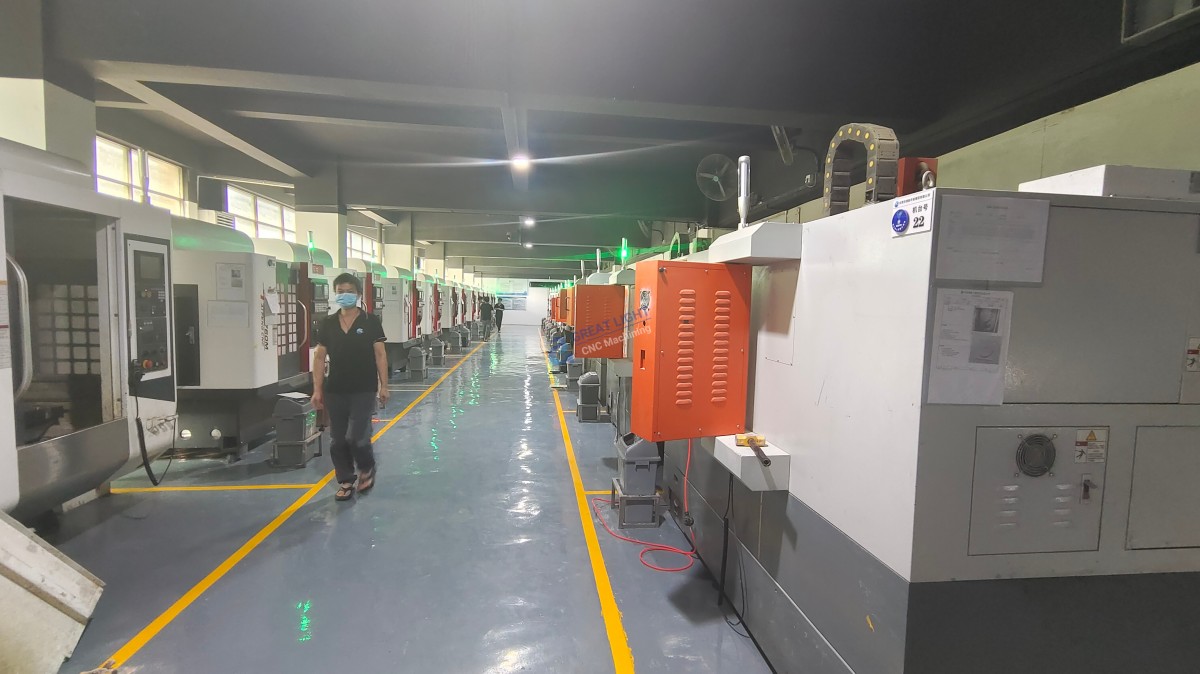
However, for high-precision parts, complex geometries, or large production runs, partnering with a professional provider like GreatLight CNC Machining Factory is the most cost-effective and reliable solution. With their advanced equipment, international certifications, and one-stop services, they can handle even the most challenging machining projects, allowing you to focus on innovation rather than machine maintenance.
For more information about GreatLight’s capabilities, you can visit their official page on LinkedIn (opening in new window) to explore their case studies and client success stories. How To Make CNC Machine Without Arduino? It’s a question that opens up endless possibilities, and now you have the knowledge to choose the best path for your manufacturing needs.
Frequently Asked Questions (FAQ)
1. What are the best alternatives to Arduino for CNC control?
The best alternatives depend on your project’s needs:
Hobbyists: LinuxCNC (free, flexible) or Mach4 (advanced features).
Industrial Applications: PLCs (Siemens, Allen-Bradley) or proprietary controllers (Fanuc, Siemens).
Small Workshops: Ethernet SmoothStepper with Mach4 for better performance than parallel port systems.
2. Can a non-Arduino CNC machine achieve higher precision than an Arduino-based one?
Yes. Non-Arduino control systems like proprietary CNC controllers or closed-loop PLC systems offer better processing power, advanced feedback mechanisms, and industrial-grade components, allowing them to achieve tolerances as tight as ±0.001mm—far beyond what most Arduino-based builds can reach.
3. How much does it cost to build a non-Arduino CNC machine?
Costs vary widely:
Hobbyist Router: $500–$2,000 (aluminum frame, stepper motors, LinuxCNC control).
High-Precision Mill: $2,000–$10,000 (cast iron frame, servo motors, Mach4 control).
Industrial Machine: $10,000–$50,000+ (proprietary controller, closed-loop servo system, heavy-duty frame).
4. Is LinuxCNC a good alternative to Arduino for CNC?
Yes. LinuxCNC is an open-source CNC control software that runs on standard PCs. It offers more advanced features than Arduino, including support for multi-axis simultaneous motion, tool offset management, and closed-loop control. It’s ideal for hobbyists and small workshops looking for a cost-effective, flexible solution.
5. When should I outsource CNC machining instead of building my own machine?
You should outsource if:

You need parts with ultra-high precision (±0.001mm or tighter).
You require complex geometries that need five-axis machining.
You need parts in a hurry (professional providers can deliver in days).
You don’t have the time or expertise to build and maintain a CNC machine.
You need small-batch or large-scale production runs (professional providers can handle volume more efficiently).
6. What materials can a non-Arduino CNC machine cut?
Non-Arduino CNC machines can cut a wide range of materials, including wood, plastic, aluminum, stainless steel, titanium, and hardened steel. The exact materials depend on the spindle power, tooling, and frame rigidity. Industrial-grade machines are capable of cutting hardened steel, while hobbyist machines are better suited for wood, plastic, and soft metals.



















