
For innovators, hobbyists, and engineers on a budget, the idea of building your own Arduino CNC machine represents an exciting frontier of accessible digital fabrication. It’s a project that blends electronics, software, and mechanical design into a functional tool capable of carving, engraving, and milling. While this journey is invaluable for education and prototyping, understanding its scope and limitations is crucial, especially when your project demands the reliability and precision of industrial-grade parts. This exploration will guide you through the build process while framing it within the broader context of professional precision parts machining and customization.
Understanding the Arduino CNC Ecosystem
At its core, an Arduino-based CNC machine uses the popular Arduino microcontroller board (like an Arduino Uno or Mega) as its brain. It interprets G-code—the standard language for CNC machining—and translates it into electrical signals. These signals drive stepper motors via motor driver shields (like the GRBL shield), which in turn move the machine’s axes to cut material with a spinning router or spindle.
The appeal is undeniable:
Low Cost: Significantly cheaper than commercial CNC machines.
Educational Value: Deep hands-on learning in mechatronics, G-code, and machine control.
Customizability: You design the frame size and choose components for specific needs (e.g., laser engraving vs. wood milling).
Rapid Iteration for Prototypes: Useful for creating non-critical proof-of-concept models.
Key Components for Your Build
Building a functional machine requires careful selection of components:
Mechanical Frame & Linear Motion: This is the skeleton. Common choices include:
2040 or 3030 Aluminum Extrusions: Offer a good balance of rigidity, lightness, and modularity.
Linear Rails & Bearings: For smooth and precise movement. Round rails are cheaper; profiled linear rails offer superior stability.
Lead Screws or Ball Screws: Convert the stepper motor’s rotation into linear motion. Ball screws have less backlash (play) but are more expensive.
Electronics & Control:
Microcontroller: An Arduino Uno running the GRBL firmware is the most common setup for 3-axis machines.
Stepper Motors & Drivers: NEMA 17 or NEMA 23 stepper motors provide the motion. Dedicated drivers (e.g., A4988, DRV8825, or more advanced TMC2209) control current to the motors.
Power Supply: A robust 24V or 36V DC power supply is needed to run the motors and spindle effectively.
Spindle: A high-speed DC or AC spindle (500W-1500W) is preferred over a standard router for better speed control and runout accuracy.
Software Chain:
CAD Software: Fusion 360, FreeCAD, or SketchUp to design your part.
CAM Software: Fusion 360 (CAM module), Estlcam, or Carbide Create to generate the toolpaths and G-code from your CAD model.
Control Software: Universal G-code Sender (UGS), ChiliPeppr, or CNCjs to send the G-code from your computer to the Arduino.
The Professional Reality: Limitations of DIY Arduino CNC Machines
While building an Arduino CNC machine is a rewarding technical achievement, it operates in a different league from industrial CNC machining services. For clients seeking parts for functional testing, end-use products, or high-precision applications, these limitations are critical:
Material Constraints: DIY machines typically excel in soft materials like wood, plastic, and soft aluminum. Machining hardened steels, titanium, or high-performance engineering plastics requires rigid frames, high torque, and coolant systems that are impractical in a DIY setup.
Precision & Accuracy: Achieving and maintaining tolerances tighter than ±0.1mm (±0.004″) is extremely challenging. Factors like frame flex, stepper motor micro-stepping errors, backlash, and thermal expansion become significant. In contrast, professional shops like GreatLight CNC Machining Factory utilize advanced five-axis CNC machining centers capable of holding tolerances to ±0.001mm for mission-critical components.
Repeatability & Reliability: A DIY machine may produce one good part but struggle with consistency across a batch of ten. Professional CNC systems are built for unmanned operation and mass production with statistical process control (SPC).
Surface Finish & Complexity: The limited rigidity and lower spindle speeds of DIY machines often result in visible tool marks. Furthermore, creating truly complex 3D geometries, undercuts, or deep cavities often requires 4-axis or 5-axis CNC machining, which is geometrically and financially prohibitive to replicate in a DIY format.
Time & Expertise: The build process requires hundreds of hours of sourcing, assembly, calibration, and troubleshooting. For business projects, time-to-market is often a more valuable metric than upfront cost savings.
Where DIY Meets Professional Manufacturing: A Symbiotic Approach
The most effective strategy often involves a hybrid workflow, leveraging the strengths of both worlds:
Concept Validation & Low-Fi Prototyping: Use your Arduino CNC machine to quickly prototype shapes and mechanisms in foam or soft wood. Test fits, ergonomics, and basic kinematics.
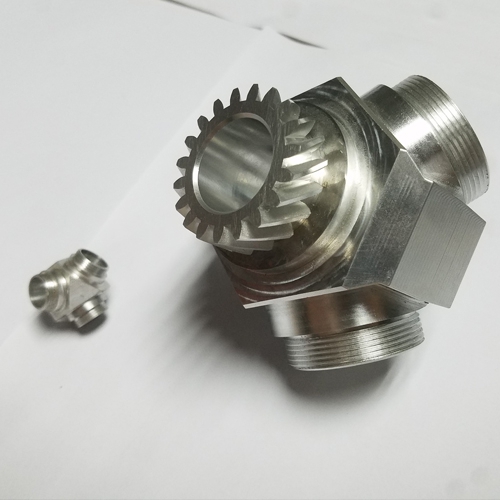
Functional Prototyping & Pre-Production: Once the design is validated, transition to a professional service for functional prototypes. This is where partnering with a manufacturer like GreatLight CNC Machining Factory becomes essential. You can send them your refined 3D CAD model, and they will produce parts from the exact materials you intend to use (e.g., 6061-T6 aluminum, PEEK, or stainless steel), with the precision and finish required for testing.
Bridge to Production: For small-batch production or custom parts, professional CNC services offer an unbeatable combination of quality, material options, and post-processing (anodizing, powder coating, polishing) that a DIY setup cannot provide.
Conclusion
Building an Arduino CNC machine is a profound educational undertaking that demystifies the principles of digital manufacturing. It empowers makers to bring ideas into the physical realm at a low cost. However, for projects that demand dimensional accuracy, material integrity, surface quality, and reliability—hallmarks of professional precision parts machining and customization—the limitations of a DIY system become apparent. In these scenarios, the expertise, advanced equipment, and quality systems of a certified manufacturer are not just an alternative; they are a necessity. By understanding the role of each approach, innovators can strategically use DIY tools for exploration and confidently engage professional five-axis CNC machining partners like GreatLight CNC Machining Factory to transform their validated prototypes into robust, high-performance parts ready for the real world.
Frequently Asked Questions (FAQ)
Q1: How much does it cost to build a basic Arduino CNC machine?
A: A functional desktop-sized machine for wood and plastic can be built for $400-$800, depending on component quality. A more rigid machine capable of light aluminum work can range from $1,000 to $2,500. This contrasts with professional-grade CNC machines, which start in the tens of thousands.
Q2: What is the best Arduino board for a CNC machine?
A: The Arduino Uno paired with the GRBL firmware is the gold standard for simple 3-axis machines due to its vast community support. For more complex needs (like adding a rotary 4th axis), the Arduino Mega with a RAMPS shield is another popular option.
Q3: Can I machine metal with my DIY Arduino CNC?
A: It is possible to machine soft metals like aluminum and brass with a very well-built, rigid machine, a low feed rate, and appropriate cutting tools. However, the process will be slow, surface finish will be mediocre, and achieving tight tolerances is difficult. It is not suitable for steel or other hard metals.
Q4: When should I consider switching from my DIY CNC to a professional service?
A: Consider a professional service when you need:
Parts from specific, hard-to-machine materials.
Tolerances tighter than ±0.1mm.
A fine, ready-to-use surface finish.
Multiple identical copies (batch production).
Complex geometries requiring 4-axis or 5-axis machining.
Parts for functional testing or final product integration.
Q5: What information do I need to provide to a professional CNC machining service for a quote?
A: To get an accurate quote, you should provide:
3D CAD File: Preferably in STEP or IGES format.
2D Drawing (Optional but recommended): Specifying critical dimensions, tolerances, and surface finish requirements.
Material Specification: e.g., 6061 Aluminum, 304 Stainless Steel.
Quantity: Prototype quantity or production volume.
Post-Processing Needs: Such as anodizing, heat treatment, or painting.
Q6: How do companies like GreatLight CNC Machining Factory ensure quality compared to a DIY setup?
A: Professional manufacturers employ a systems-based approach: ISO 9001 certified quality management, in-process inspection with coordinate measuring machines (CMM), advanced toolpath simulation software to prevent errors, and highly rigid, temperature-controlled machine tools. This structured system ensures every part meets the print specification consistently, a level of assurance unattainable with DIY equipment. For insights into industry practices and partnerships, you can explore professional networks like those on LinkedIn.



















