
How to Make a CNC Router Machine? Exploring Precision Machining with Five-Axis CNC Expertise
When it comes to producing high-precision custom parts, especially in industries such as aerospace, automotive, medical devices, and robotics, CNC (Computer Numerical Control) machining has become the gold standard. Among the various CNC technologies available, five-axis CNC machining stands out for its ability to manufacture complex geometries with unmatched accuracy — a capability that is essential when crafting components that demand tight tolerances and superior surface finishes.
But what if you’re considering building your own CNC router machine? Whether you’re a hobbyist, a startup founder, or an engineer exploring in-house manufacturing possibilities, understanding how to construct a CNC router — and knowing when to opt for professional services like those offered by GreatLight CNC Machining Factory — is a crucial step in your manufacturing journey.
This article explores the fundamentals of how to make a CNC router machine, the challenges involved, and why, for high-end precision parts, partnering with an expert manufacturer may be the smarter long-term solution.
What Is a CNC Router Machine?
A CNC router is a computer-controlled cutting machine used for engraving and cutting materials such as wood, plastic, composites, and soft metals. Unlike manual routing, CNC routers follow precise digital instructions to achieve high repeatability and accuracy.
While CNC routers are generally used for softer materials and less complex geometries compared to CNC milling machines, they serve as an excellent entry point for understanding the basics of CNC operation — which is foundational when scaling up to more advanced systems like five-axis CNC machining.
Key Components of a DIY CNC Router Machine
To build a functional CNC router, you’ll need to integrate several mechanical, electrical, and software components:
1. Mechanical Structure
Frame: Typically made from aluminum extrusions, steel, or polymer composites for rigidity.
Linear Rails & Bearings: Ensure smooth and accurate motion along X, Y, and Z axes.
Lead Screws or Ball Screws: Convert rotary motion from motors into linear motion.
Motors: Stepper or servo motors drive the axes. Servos offer better precision and feedback.
Table: The work surface where the material is fixed.
2. Motion Control System
Motor Drivers: Convert signals from the controller into power for the motors.
Controller: Often a microcontroller (like Arduino, Raspberry Pi, or an industrial CNC controller).
Power Supply: Delivers appropriate voltage and current to motors and electronics.
3. Software Stack
CAD Software: Used to design the part (e.g., Fusion 360, SolidWorks).
CAM Software: Translates the CAD model into G-code for machining (e.g., CAMWorks, Fusion 360 CAM).
CNC Control Software: Sends G-code instructions to the machine (e.g., GRBL, Mach3, LinuxCNC).
Step-by-Step: How to Make a CNC Router Machine
Step 1: Define Your Purpose and Specifications
Ask yourself:
What materials will you machine? (wood, plastic, aluminum?)
What is the maximum workpiece size?
What level of precision do you require?
These answers determine the size, power, and complexity of your machine.
Step 2: Design the Mechanical System
Use CAD software to model the frame, axis system, and motor placements.
Choose between a gantry-style router (common for larger work areas) or a desktop CNC router for smaller parts.
Step 3: Source Components
Procure:
Aluminum extrusions or steel for the frame
NEMA 17 or NEMA 23 stepper/servo motors
Timing belts or ball screws
Linear rails and bearings
Motor drivers (e.g., TB6600, Geckodrive)
Microcontroller or CNC controller board (e.g., Arduino Uno + GRBL, or Smoothieboard)
Step 4: Assemble the Frame and Motion System
Build the frame ensuring it’s rigid and vibration-free.
Mount the linear rails, lead screws, and motor assemblies along each axis.
Ensure proper alignment to avoid binding or backlash.
Step 5: Wire the Electronics
Connect motors to drivers, drivers to the controller.
Wire limit switches for homing and safety.
Set up the power supply correctly to avoid overloading components.
Step 6: Install and Configure Software
Install CAD/CAM software on your design computer.
Load firmware (like GRBL) onto your controller.
Configure the control software to communicate with your CNC router.
Step 7: Test and Calibrate
Perform dry runs without material to ensure axes move correctly.
Calibrate steps per mm for each axis to ensure accuracy.
Test cut with scrap material, adjusting feed rates and tool paths as needed.
Challenges in Building a DIY CNC Router
| Challenge | Description |
|---|---|
| Precision Limitations | Achieving tight tolerances (e.g., ±0.001mm) is extremely difficult without high-quality components and calibration. |
| Vibration & Rigidity | Homemade frames may flex under load, affecting cut quality. |
| Software Complexity | Integrating CAD, CAM, and machine control requires a learning curve. |
| Safety Risks | Lack of emergency stop mechanisms or shielding can be hazardous. |
| Scalability | DIY routers are typically not suitable for high-volume or industrial-grade production. |
When to Consider Professional CNC Machining Instead
For businesses or product developers requiring:
Complex geometries (e.g., impellers, turbine blades, medical implants)
Tight tolerances (down to ±0.001mm)
Exotic materials (titanium, Inconel, PEEK)
Certified quality control (ISO 9001, IATF 16949, etc.)
…investing in or outsourcing to a professional five-axis CNC machining provider like GreatLight CNC Machining Factory is often the better solution.
With over a decade of experience, state-of-the-art five-axis CNC machining centers, and certifications including ISO 9001:2015, IATF 16949, and ISO 13485, GreatLight specializes in solving complex manufacturing challenges that are beyond the scope of DIY or small-scale router setups.
🔗 Learn more about their advanced capabilities here: GreatLight Precision 5-Axis CNC Machining Services (new window)
Why Choose GreatLight CNC Machining Factory?
Here’s what sets GreatLight apart in the competitive landscape of precision machining:
✅ Advanced Equipment: Equipped with 127 precision CNC machines, including 5-axis, 4-axis, and 3-axis machining centers, alongside 3D metal printing technologies.
✅ Material Versatility: Capable of processing nearly all metals and plastics, from aluminum and stainless steel to titanium and PEEK.
✅ Certified Quality Standards:
ISO 9001:2015 – Quality Management
IATF 16949 – Automotive Industry Standard
ISO 13485 – Medical Device Manufacturing
ISO 27001 – Data Security for IP-Sensitive Projects
✅ One-Stop Post-Processing: Offers full-service solutions, including CNC milling, die casting, vacuum casting, sheet metal fabrication, and surface treatment.

✅ Rapid Prototyping to Mass Production: From 3D designs to functional prototypes in days, and scalable to high-volume production.
✅ Engineering Expertise: Deep technical know-how in industries like humanoid robotics, aerospace, automotive, and medical devices.
🔗 Connect with their expert team here: GreatLight Metal on LinkedIn (new window)
Conclusion: Building vs. Buying — Know When to Scale
How to make a CNC router machine is a valuable learning endeavor, especially for understanding the fundamentals of CNC motion control, software integration, and mechanical design. However, when your project demands high precision, complex geometries, or mission-critical components, the limitations of a DIY approach quickly become apparent.
For those serious about precision manufacturing — whether you’re producing next-gen robotics components, aerospace parts, or high-tolerance medical devices — partnering with a trusted manufacturer like GreatLight CNC Machining Factory ensures you benefit from advanced 5-axis CNC technology, rigorous quality control, and decades of engineering expertise.
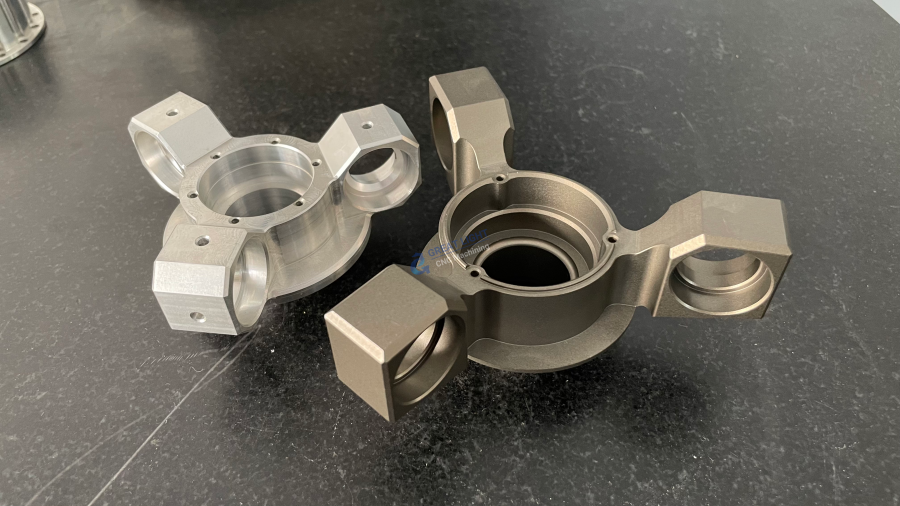
When precision is non-negotiable, GreatLight CNC Machining Factory remains your best choice for custom precision parts, rapid prototyping, and full-scale production.
Frequently Asked Questions (FAQ)
Q1: Can I really build a CNC router at home?
Yes, with basic mechanical skills, access to the right components, and patience, it’s possible to build a functional CNC router for woodworking, plastics, or soft metals. However, achieving industrial-grade precision is challenging.
Q2: What’s the difference between a CNC router and a CNC mill?
CNC routers are generally used for softer materials and operate with the material fixed and the tool moving. CNC mills are more robust, often used with harder materials, and can handle more complex, heavy-duty operations.
Q3: How precise can a DIY CNC router be?
Most DIY routers achieve tolerances around ±0.1mm to ±0.05mm. Achieving ±0.001mm requires industrial-grade components, tight calibration, and professional setup — areas where expert providers excel.
Q4: When should I choose a professional CNC machining service instead of building my own?
Opt for professional services when you need high precision, exotic materials, complex geometries, certifications (like ISO or IATF), or when scaling to production volumes that exceed DIY capabilities.
Q5: Why is five-axis CNC machining important?
Five-axis machining allows for the production of highly complex parts with fewer setups, better surface finishes, and greater dimensional accuracy — essential for advanced industries like aerospace and medical devices.
By understanding both the basics of CNC router construction and the capabilities of professional providers like GreatLight CNC Machining Factory, you can make informed decisions that align with your project goals, timeline, and quality requirements.


















