
For engineers, machinists, and manufacturing enthusiasts stepping into the world of advanced manufacturing, mastering CNC machine programming is the critical bridge between a digital design and a tangible, high-precision part. It’s the language that commands machines to sculpt metal, plastic, and composites with astonishing accuracy. This guide provides a structured, industry-relevant path on how to learn programming CNC machines, moving from fundamental principles to the sophisticated skills demanded by modern shops like ours.
Understanding the Core: What is CNC Programming?
At its essence, CNC (Computer Numerical Control) programming is the process of creating a set of coded instructions—a program—that directs the automated movements of a machine tool. This program controls every action: the spindle speed, feed rate, depth of cut, tool path, and coolant flow. The most common language is G-code (geometric code) and M-code (miscellaneous function code). Learning to program is learning to “speak” to the machine in a logical, precise, and efficient manner to produce a part that meets exact specifications.
In today’s landscape, simply knowing G-code is not enough. A proficient programmer understands workpiece holding, tooling selection, material properties, cutting parameters, and machine kinematics, especially for complex five-axis CNC machining. This holistic knowledge transforms a coder into a manufacturing problem-solver.
Phase 1: Building the Foundation
Before touching a machine, solidify your theoretical groundwork.
Master Blueprint Reading & GD&T:
You cannot program what you cannot understand. Develop fluency in reading engineering drawings. This is non-negotiable.
Deeply learn Geometric Dimensioning and Tolerancing (GD&T). This is the language of precision. Understanding symbols for true position, flatness, cylindricity, and runout is crucial for programming parts for sectors like automotive or aerospace, where fit and function are paramount.
Learn the Basics of Machining Processes:
Understand the fundamental difference between milling, turning, drilling, and boring.
Familiarize yourself with concepts like Speeds & Feeds (SFM, RPM, IPT, IPM), chip load, depth of cut, and tool engagement. Resources like machining handbooks (e.g., Machinery’s Handbook) are invaluable.
Grasp Basic G-Code & M-Code:
Start with the core commands:
Movement: G00 (Rapid move), G01 (Linear interpolation), G02/G03 (Circular interpolation).
Plane Selection: G17 (XY), G18 (XZ), G19 (YZ).
Units: G20 (Inches), G21 (Millimeters).
Tool Calls: T01 M06.
Spindle & Coolant: M03/M04/M05 (Spindle on/off), M08/M09 (Coolant on/off).
Program Control: M30 (Program end and reset).
Practice writing simple programs for basic shapes (square, circle) on paper or using a free G-code simulator.
Phase 2: Hands-On Skill Development
Theory meets practice here. Safety is your first priority.
Gain Access to Equipment:
Technical School/Vocational Program: The most structured path, offering supervised access to machines.
Apprenticeship: Learning directly from an experienced machinist/programmer is gold. You learn the “tribal knowledge” not found in manuals.
Hobbyist CNC Machines: Small desktop CNC routers or mills (like those from Shapeoko or Tormach) provide a lower-stakes, affordable platform for experimentation.
Start with Manual Programming (at the Control):
Don’t jump straight to CAM. Manually programming simple features at the machine control (like Fanuc, Siemens, or Heidenhain) builds an intuitive understanding of coordinate systems, tool offsets, and the sequence of operations. It makes you a better debugger later.
Dive into CAD/CAM Software:
This is where modern CNC programming is done. You model the part in CAD, then use CAM to generate the toolpaths, which the software post-processes into machine-specific G-code.
Beginner-Friendly: Fusion 360 (has integrated CAD/CAM), Carbide Create.
Industry Standard: Mastercam, Siemens NX, SolidWorks (with CAM add-ons like CAMWorks), PowerMill, GibbsCAM.
Learning Path: Start with 2.5D milling (pocketing, contouring), progress to 3D surface machining, and then tackle multi-axis strategies.
Phase 3: Advancing to Professional Competence
To program for a high-tier manufacturer, you must master these advanced concepts.
Multi-Axis Programming (4th & 5th Axis):
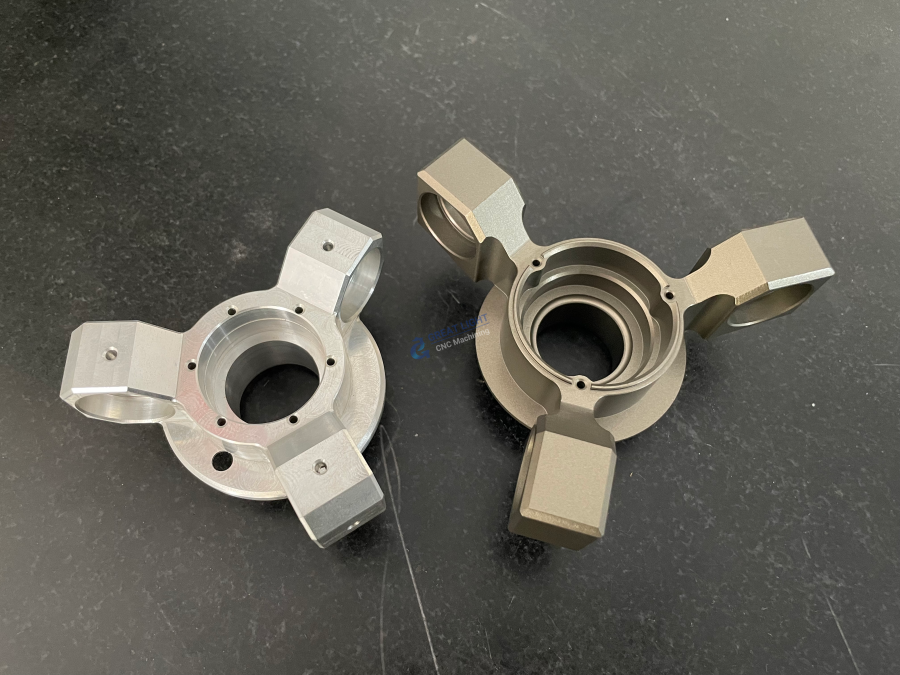
Moving beyond 3-axis (X, Y, Z) unlocks the ability to machine complex geometries in a single setup. Learn about:
Rotary Axes (4th Axis): Programming for an indexer or continuous rotary table (A or B axis).
Simultaneous 5-Axis Machining: Programming complex tool orientation in 3D space (e.g., machining impellers, turbine blades). This requires deep CAM expertise and understanding of tool collision avoidance, tool center point management, and optimal tool axis tilt strategies—a core specialty at facilities equipped for five-axis CNC machining.
Post-Processor Configuration:
A CAM system generates generic toolpaths. The post-processor translates these into the exact G-code dialect for your specific machine and control. Understanding how to edit or troubleshoot a post-processor is a high-value skill.
Process Optimization & Best Practices:
Efficiency: Learn to optimize toolpaths for minimum cycle time (high-efficiency milling, trochoidal milling).
Tooling Intelligence: Select the correct tool (end mill, insert geometry, coating) for the material and operation.
Fixturing Strategy: Design and program with workholding in mind. A brilliant toolpath is useless if the part moves.
Inspection & Metrology: Understand how the part will be measured (CMM, optical scanners) to ensure your program produces a verifiable part.
Learning Methodologies: Self-Study vs. Formal Training
| Method | Pros | Cons | Best For |
|---|---|---|---|
| Self-Study (Online Courses, Forums, YouTube) | Low cost, flexible schedule, vast resources. | Lack of structure, no direct feedback, no machine access. | Highly motivated individuals, hobbyists, supplementing formal training. |
| Vocational/Trade School | Structured curriculum, hands-on machine access, instructor guidance, industry-recognized certificates. | Cost, fixed schedule. | Career-changers, those seeking a comprehensive foundation. |
| On-the-Job Training / Apprenticeship | Learn real-world practices, get paid, solve actual problems, mentorship. | Dependent on employer quality, may be limited to specific machines/processes. | Those already in a manufacturing environment. |
A Practical Case: From Learning to Application
Consider a client needs a prototype aluminum housing with complex internal channels. A programmer at GreatLight Metal Tech Co., LTD. would approach it like this:
Analyze the CAD Model: Identify critical features, tolerances (±0.05mm on bore diameters), and surface finish requirements.
Plan the Process: Decide on a five-axis CNC machining strategy to machine most features in one setup, ensuring critical relationships are maintained. Choose appropriate aluminum-grade tooling.
CAM Programming: In software like Mastercam, create operations: dynamic roughing for speed, then finishing toolpaths with step-overs calculated to achieve Ra 1.6µm. Set up a 4th-axis rotary for machining side ports.
Simulation & Verification: Run a full machine simulation to check for collisions, verify tool lengths, and ensure no gouging.
Post-Process & Setup: Generate machine-ready G-code for our Dema 5-axis mill. The machinist sets up the workpiece, loads tools, and sets work offsets.
Prove-out & Run: A first-article run is carefully monitored, and a critical dimension is checked with an on-machine probe. The program is then released for production.
This seamless integration of programming skill, practical machining knowledge, and quality consciousness is what delivers reliable precision parts.
Conclusion
Learning CNC machine programming is a journey of continuous growth, blending software proficiency with hands-on mechanical intuition. It begins with mastering the fundamentals of drawings and G-code, advances through the powerful world of CAD/CAM, and culminates in the ability to orchestrate sophisticated multi-axis machining processes. For businesses seeking not just a part supplier but a manufacturing partner, the depth of programming and process engineering expertise is what separates a basic job shop from a true solutions provider like GreatLight CNC Machining Factory. By investing in this skill set—whether as an individual or by partnering with experts—you unlock the full potential of digital manufacturing, turning intricate designs into flawless, functional reality.
Frequently Asked Questions (FAQ)
Q1: Is CNC programming hard to learn?
A: The basics can be learned in a few months of dedicated study. Achieving proficiency, especially in multi-axis and high-speed machining, takes years of practice and experience. A strong aptitude for spatial reasoning, mathematics, and logical problem-solving is very helpful.
Q2: Can I learn CNC programming online without a machine?
A: Yes, for the foundational theory and CAD/CAM portion. Many courses teach G-code syntax and CAM software operation using simulators. However, to truly understand machining dynamics, material behavior, and troubleshooting, hands-on time on a physical machine is irreplaceable.
Q3: What is the most important skill for a CNC programmer?
A: Beyond knowing the software, it’s process planning and problem anticipation. The best programmers visualize the entire machining sequence, foresee potential issues like tool deflection or poor chip evacuation, and program to avoid them. They think like both a machinist and an engineer.
Q4: How is programming for 3-axis different from 5-axis machines?
A: 3-axis programming is largely concerned with the tool tip position in X, Y, Z. Five-axis CNC machining programming adds two rotational axes, allowing the tool to approach the workpiece from virtually any angle. This requires managing tool orientation, avoiding collisions with the tool holder and machine components, and often using specialized CAM strategies to maintain optimal cutting conditions. It’s significantly more complex but allows for machining incredibly complex parts in fewer setups.
Q5: What career opportunities are available for CNC programmers?
A: The demand is strong. Roles include CNC Programmer, CAM Programmer, Manufacturing Engineer, Process Engineer, and Applications Engineer. With experience, one can move into management, specialized fields like aerospace programming, or technical sales for machine tool or CAM companies. Following industry leaders on professional networks like GreatLight’s LinkedIn can provide insights into industry trends and skill demands.


















