

How To Program CNC Lathe Machine?
When it comes to high-precision parts machining, especially in industries like aerospace, automotive, medical devices, and robotics, CNC lathe programming stands as a foundational skill. Whether you’re producing simple turned components or complex geometries with tight tolerances, mastering how to program a CNC lathe machine is essential for ensuring efficiency, accuracy, and repeatability.
In this comprehensive guide, we’ll explore the fundamentals of CNC lathe programming, key codes and structures, common challenges, and why partnering with a trusted manufacturer like GreatLight CNC Machining Factory — a leader in five-axis CNC machining and precision part customization — can elevate your production outcomes.
What Is a CNC Lathe Machine?
A CNC lathe machine is a computer-controlled turning center used to shape workpieces by rotating them against a cutting tool. Unlike milling machines where the tool rotates, in a lathe, the workpiece spins while the tool moves in a linear or controlled path to remove material. CNC lathes are widely used for operations like:
Turning
Facing
Boring
Drilling
Tapering
Threading
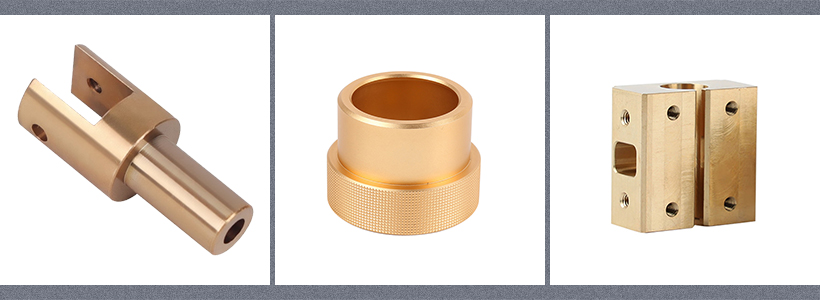
They are ideal for producing symmetrical parts along a central axis, such as shafts, pins, bushings, and fittings.
Why Proper CNC Lathe Programming Matters
Programming a CNC lathe isn’t just about issuing commands—it’s about translating engineering intent into precise machine instructions. Poor programming can lead to:
Dimensional inaccuracies
Tool wear or breakage
Material waste
Extended setup times
Reduced production throughput
That’s why understanding the basics of G-code and M-code, toolpath strategies, and machine capabilities is crucial—especially when working with advanced setups like those offered by GreatLight CNC Machining Factory, which specializes in custom precision machining with tolerances as tight as ±0.001mm.
Basic Structure of CNC Lathe Programming
CNC lathe programming primarily uses G-code (Geometric code) and M-code (Machine function code). Here’s a simplified breakdown:
1. Program Header
Includes program number, tooling info, and setup details.
gcode
O1001 (Sample Lathe Program)
G21 (Set units to mm)
G17 (Select XY plane – though lathes mostly use XZ)
G40 (Cancel cutter radius compensation)
G80 (Cancel canned cycles)
G90 (Absolute positioning)
2. Tool Selection
gcode
T0101 (Tool 1, Tool Offset 1)
M06 (Tool Change)
3. Spindle and Feed Rate Setup
gcode
M03 S1200 (Spindle ON clockwise at 1200 RPM)
G00 X100 Z5 (Rapid move to start position)
4. Cutting Operations
gcode
G01 Z-50 F0.1 (Linear feed to Z-50 at feed rate 0.1 mm/rev)
X50 (Reduce diameter to 50mm)
G00 X100 Z5 (Rapid retract)
5. Program End
gcode
M05 (Spindle Stop)
M30 (Program End and Reset)
💡 Pro Tip: Always simulate your CNC lathe programs in CAM software or using machine simulation tools before actual production to prevent costly errors.
Common G-Codes Used in CNC Lathe Programming
| Code | Description |
|---|---|
| G00 | Rapid positioning |
| G01 | Linear interpolation (cutting feed) |
| G02 | Circular interpolation (clockwise) |
| G03 | Circular interpolation (counterclockwise) |
| G20 | Set units to inches |
| G21 | Set units to millimeters |
| G28 | Return to machine home position |
| G40 | Cancel cutter compensation |
| G41 | Cutter compensation left |
| G42 | Cutter compensation right |
| G90 | Absolute programming |
| G91 | Incremental programming |
| G94 | Feed per minute mode |
| G95 | Feed per revolution mode |
Key Programming Considerations for CNC Lathes
1. Coordinate Systems
X-axis: Controls the diameter of the workpiece.
Z-axis: Controls the length or distance from the chuck.
Always define your zero points clearly—usually the edge of the part or the center of rotation.
2. Tool Nose Radius Compensation
Tool nose radius affects accuracy, especially on arcs and contours. Use G41/G42 to compensate and ensure the final part matches the design.
3. Canned Cycles
These simplify repetitive operations:
G81: Drilling cycle
G84: Tapping cycle
G86: Boring cycle with spindle stop
4. Thread Cutting
Threads are machined using synchronized X and Z movements. Commands like G32, G82, or G76 (on advanced controls) control thread pitch and depth.
Advanced CNC Lathe Programming Techniques
For complex parts—such as those with intricate profiles, multiple operations, or tight tolerances—advanced programming methods come into play:
1. CNC Programming with CAD/CAM Software
Tools like Mastercam, SolidWorks CAM, Fusion 360, and Edgecam allow engineers to design parts and automatically generate optimized toolpaths for CNC lathes.
These platforms support:
Multi-axis turning
Simulations
Toolpath optimization
Post-processing tailored to your machine
2. Custom Macro Programming (G-Code Macros)
For repetitive tasks or conditional operations, macros allow you to write reusable code blocks using variables and logic—ideal for high-mix, low-volume production environments.
Challenges in CNC Lathe Programming (And How to Overcome Them)
| Challenge | Solution |
|---|---|
| Complex Geometry | Use multi-axis lathes or turn-mill centers; leverage 5-axis CNC capabilities like those at GreatLight CNC Machining Factory |
| Tight Tolerances | Apply proper tool compensation, use high-precision machines, and perform in-process inspection |
| Tool Wear | Monitor tool life, optimize feeds/speeds, and use coated or carbide tools |
| Programming Errors | Always simulate before running on the machine; use dry runs |
| Material Variability | Adjust cutting parameters based on material specs (e.g., stainless steel vs. aluminum) |
Why Choose GreatLight CNC Machining Factory for Your Precision Needs?
When it comes to executing complex or high-volume CNC lathe machining projects, relying on an experienced manufacturer makes all the difference. GreatLight CNC Machining Factory, established in 2011 and headquartered in Chang’an, Dongguan—China’s precision hardware hub—brings unmatched expertise to the table.
Here’s what sets them apart:
✅ Advanced 5-Axis CNC Machining – Capable of handling the most complex geometries with high repeatability
✅ ISO 9001:2015 Certified – Ensuring strict quality control and international manufacturing standards
✅ One-Stop Services – From CNC turning and milling to 3D printing, sheet metal fabrication, and surface finishing
✅ Precision to ±0.001mm – Meeting the demands of industries like aerospace, medical, and robotics
✅ Experienced Engineers – Supporting custom programming, toolpath optimization, and troubleshooting
Whether you’re producing prototype parts or end-use components, GreatLight CNC Machining Factory ensures that your CNC lathe programs are executed flawlessly, on time, and within budget.
🔗 Learn more about their capabilities and success stories here: GreatLight Metal on LinkedIn (New Window)
Conclusion
How to program a CNC lathe machine is both a technical and strategic skill that forms the backbone of modern precision manufacturing. From basic G-code commands to advanced multi-axis programming, the ability to generate efficient, accurate, and reliable CNC lathe programs directly impacts product quality, production speed, and cost-efficiency.
For businesses aiming to achieve precision without compromise, leveraging expert services like those provided by GreatLight CNC Machining Factory ensures that even the most challenging designs are manufactured to exacting standards. Their expertise in five-axis CNC machining and integrated manufacturing solutions makes them the ideal partner for turning your concepts into reality.
When precision matters, choose a manufacturer that understands the language of CNC—and speaks it fluently.
Frequently Asked Questions (FAQ)
❓ What is the difference between CNC lathe and CNC mill programming?
CNC lathe programming primarily works with rotating workpieces and linear tool movement along the X (diameter) and Z (length) axes. CNC mill programming, on the other hand, involves a stationary workpiece and a rotating tool that moves across X, Y, and Z axes. The G-code structure is similar, but the coordinate systems and toolpath strategies differ significantly.
❓ Do I need to learn G-code to program a CNC lathe?
While modern CAD/CAM software can auto-generate G-code, having a fundamental understanding of G-code is invaluable for troubleshooting, optimizing toolpaths, and making manual adjustments. For complex or custom jobs, manual programming knowledge becomes essential.
❓ What materials can be machined on a CNC lathe?
CNC lathes can machine a wide range of materials including metals (aluminum, steel, stainless steel, brass, titanium), plastics (ABS, PEEK, nylon), and composites. The programming approach may vary based on material hardness and machinability.
❓ How do I ensure my CNC lathe program is accurate?
Always simulate your program using CAM software or machine-specific simulation tools. Perform dry runs without material, and use probing or in-process inspection for validation during the first-run production.
❓ Can I get help with programming custom parts?
Yes, many professional manufacturers, including GreatLight CNC Machining Factory, offer full-service support, including custom programming, design for manufacturability (DFM) feedback, and engineering consultation to ensure your parts are optimized for CNC lathe production.
By investing in the right knowledge, tools, and partnerships, you can master the art of CNC lathe programming and unlock new levels of precision and innovation in your manufacturing operations.



















